<?xml version="1.0" encoding="utf-8"?><feed xmlns="http://www.w3.org/2005/Atom" ><generator uri="https://jekyllrb.com/" version="4.3.4">Jekyll</generator><link href="https://freetimecoder.net/feed.xml" rel="self" type="application/atom+xml" /><link href="https://freetimecoder.net/" rel="alternate" type="text/html" /><updated>2026-10-15T20:11:06+02:00</updated><id>https://freetimecoder.net/feed.xml</id><title type="html">FreetimeCoder’s Blog</title><entry><title type="html">Desan</title><link href="https://freetimecoder.net/games/Desan/" rel="alternate" type="text/html" title="Desan" /><published>2025-11-27T00:00:00+01:00</published><updated>2025-11-27T00:00:00+01:00</updated><id>https://freetimecoder.net/games/Desan</id><content type="html" xml:base="https://freetimecoder.net/games/Desan/"><![CDATA[<div class="video-container">
    <iframe width="560" height="315" src="https://www.youtube.com/embed/q7ijAolH9wo" title="YouTube video player" frameborder="0" allow="accelerometer; autoplay; clipboard-write; encrypted-media; gyroscope; picture-in-picture" allowfullscreen=""></iframe>
</div>

<div class="row">
    <div class="col">
        <a href="/assets/images/desan/screenshot_001.jpg">
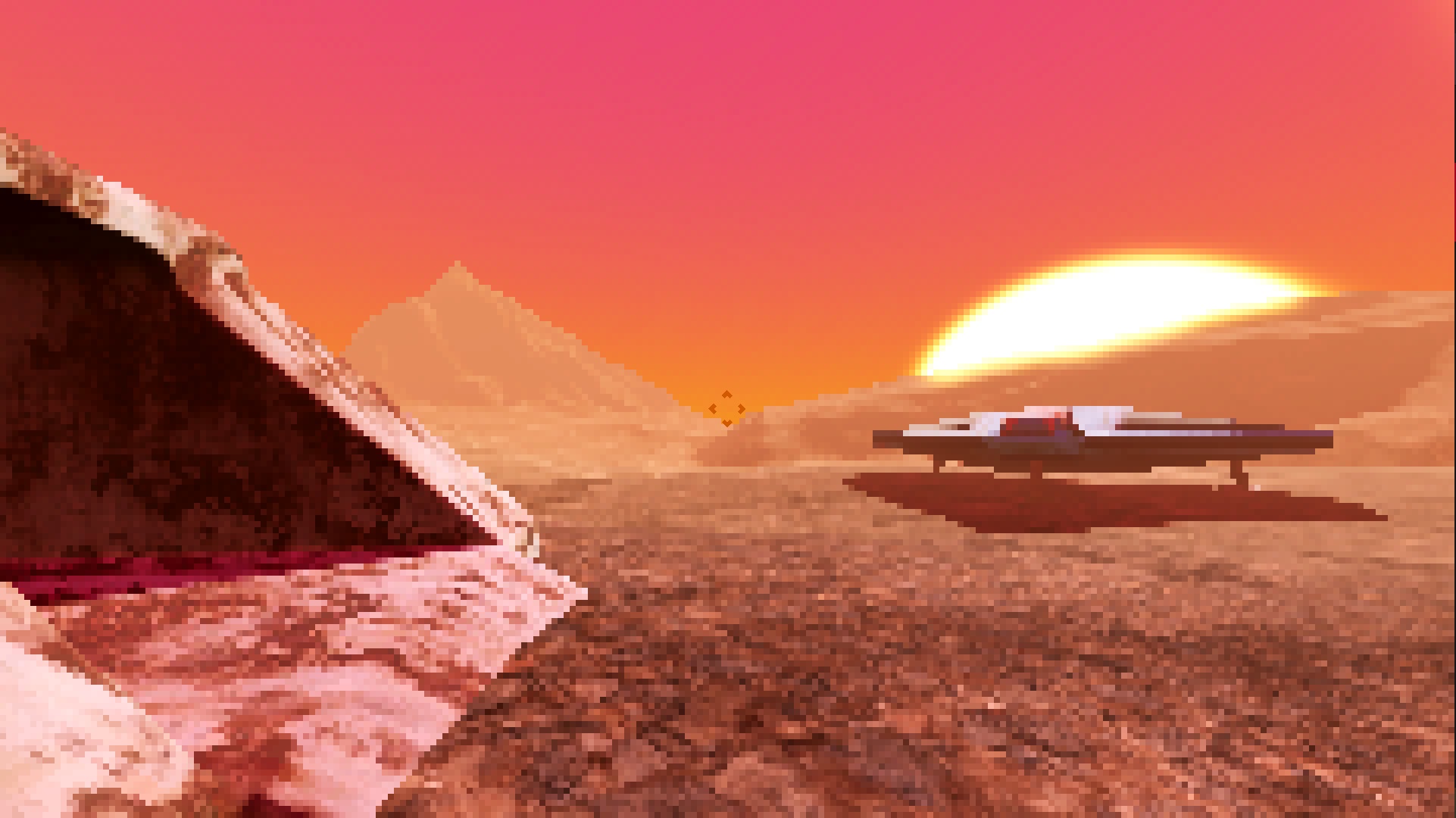
  <img src="/assets/images/desan/screenshot_001.jpg" alt="A spaceship stands on a desert planet under a pink sky." class="full" />
</a>
    </div>
    <div class="col">
        <a href="/assets/images/desan/screenshot_002.jpg">
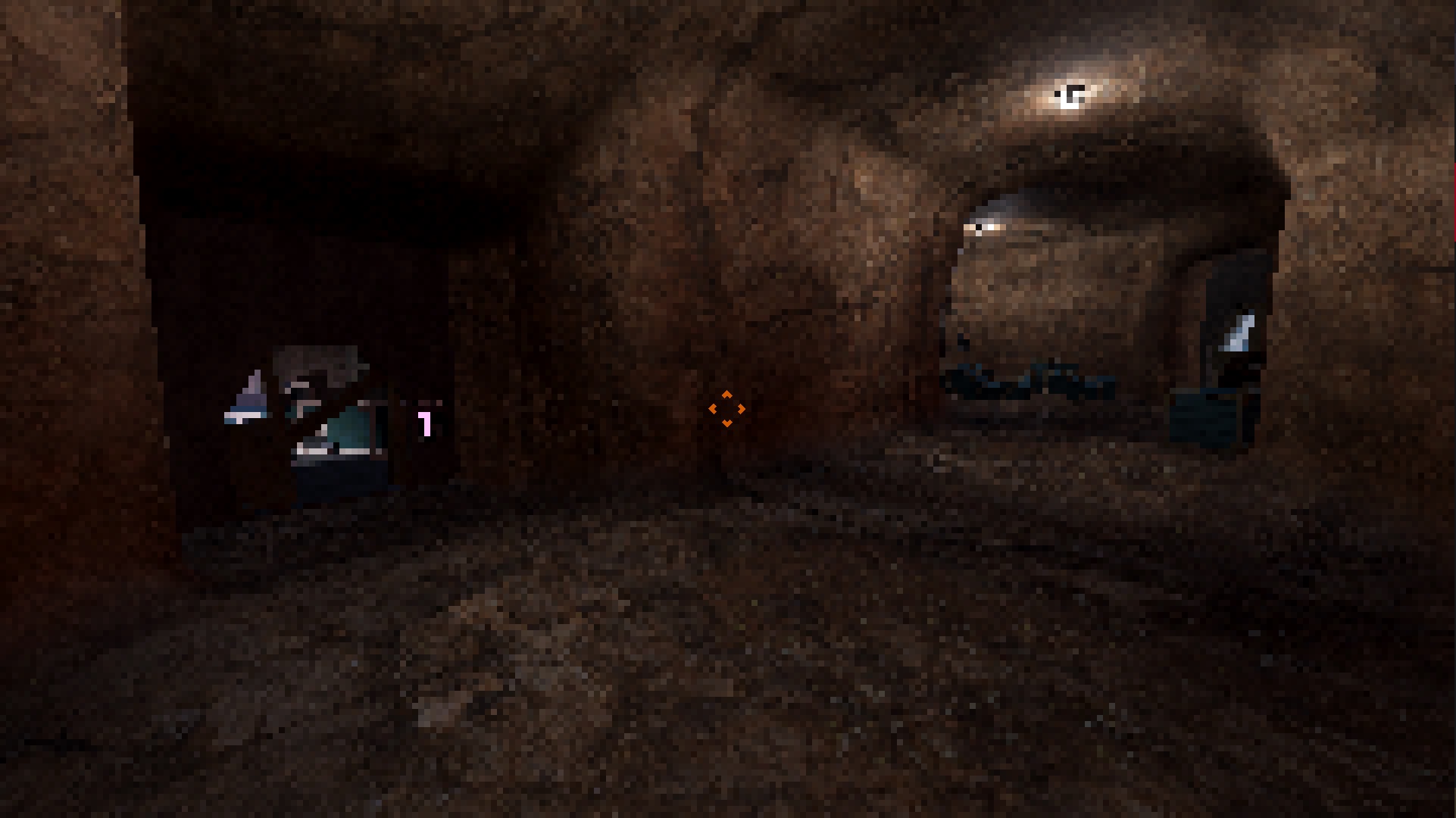
  <img src="/assets/images/desan/screenshot_002.jpg" alt="A crossing of underground rock tunnels with doors." class="full" />
</a>
    </div>
    <div class="col">
        <a href="/assets/images/desan/screenshot_003.jpg">
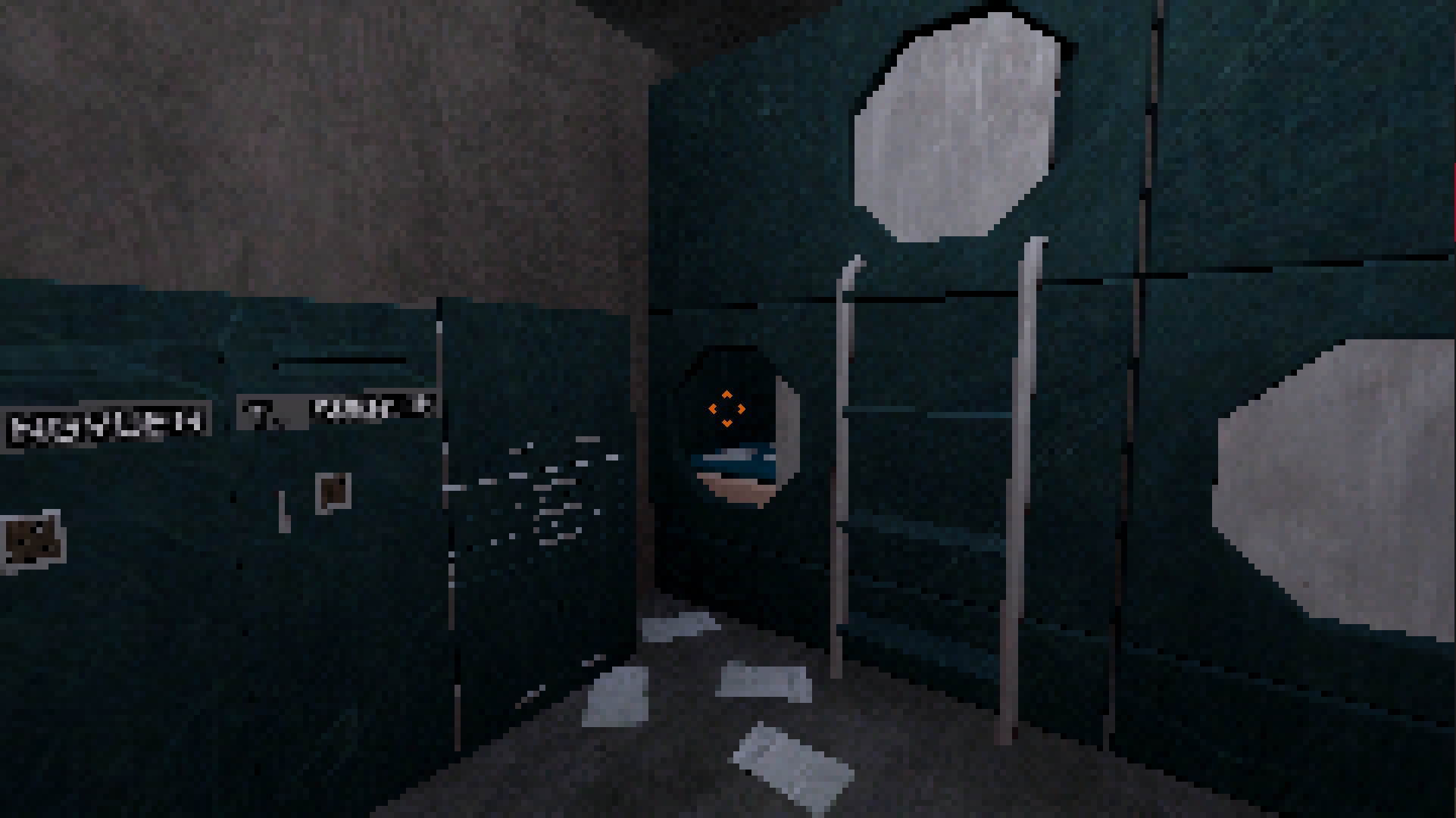
  <img src="/assets/images/desan/screenshot_003.jpg" alt="Bunk beds and lockers in a concrete room." class="full" />
</a>
    </div>
</div>
<p>A distress signal awakes you from cryosleep. A base on a nearby planet calls for aid, but when you arrive the place is deserted…
<br /></p>
<div class="row">
	<div class="col">


			<a href="https://freetimecoder.itch.io/desan" class="btn btn-secondary btn-lg" role="button"><i class="bi bi-download"></i> Get it on itch.io</a>


	</div>
</div>

<h2 id="origins">Origins</h2>

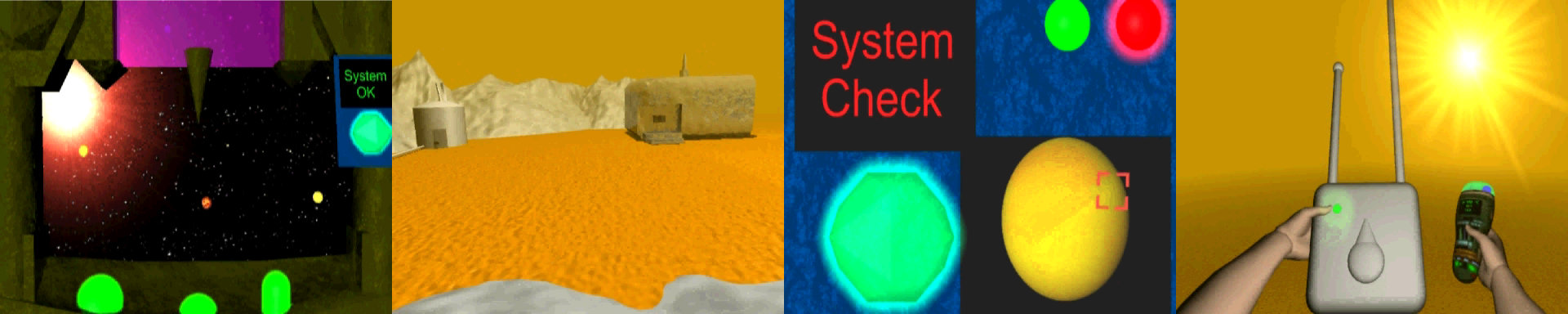
<p>Desan is a reimagening of the very first computer game I made in 2005, also titled Desan. 14 year old me only had basic grasps of the English language and the game was taking place on a desert planet after all. I created the entire game as a point and click website using Cinema4D 6 CE and Adobe Image Ready. One I got from a magazine, the other by using my dad’s work PC. I had no idea what programming even was, just an idea and determination.</p>

<p>Today, only a few images remain from this version.  The drive wasn’t backed up and when it failed it took almost everything with it. I remember burning the game to a CD to share, but that too is lost to time.</p>

<p><a href="/assets/images/desan/desan_original.jpg">
  <img src="/assets/images/desan/desan_original.jpg" alt="Original Desan Screenshots" class="full" />
</a></p>

<hr />

<p>It seemed fitting to revisit this as my entry project to learn Godot. It took about three weeks, and I’m really happy how it turned out. My plan is to take a break now and revisit it in the future.</p>

<h2 id="credits--licenses">Credits &amp; Licenses</h2>

<p>No one makes a video game alone. This thanks is dedicated to the countless individuals that make this possible. Software, assets, tutorials, addons, documentation, forums take years of dedication. The tech world constantly tries to hide this fact, but I am truly in awe of the community.</p>

<h3 id="godot-engine">Godot Engine</h3>

<table>
  <thead>
    <tr>
      <th>Asset</th>
      <th>License</th>
      <th>Author</th>
    </tr>
  </thead>
  <tbody>
    <tr>
      <td><a href="https://godotengine.org/license/">Godot Engine</a></td>
      <td>MIT</td>
      <td>Copyright (c) 2014-present Godot Engine contributors.<br />Copyright (c) 2007-2014 Juan Linietsky, Ariel Manzur.</td>
    </tr>
    <tr>
      <td><a href="https://github.com/warriormaster12/godot_play_from_here/">Godot Play From Here plugin</a></td>
      <td>MIT</td>
      <td>Copyright (c) 2025 Alexander Streng</td>
    </tr>
    <tr>
      <td><a href="https://github.com/godot-extended-libraries/godot-debug-menu">Debug Menu add-on for Godot 4.x</a></td>
      <td>MIT</td>
      <td>Copyright Â© 2023-present Hugo Locurcio and contributors</td>
    </tr>
  </tbody>
</table>

<p><br /></p>

<h3 id="freesoundorg">Freesound.org</h3>

<table>
  <thead>
    <tr>
      <th>Asset</th>
      <th>License</th>
      <th>Author</th>
    </tr>
  </thead>
  <tbody>
    <tr>
      <td><a href="https://freesound.org/s/664262/">Confirm Beeps (No Delay).wav</a></td>
      <td>Attribution 4.0</td>
      <td>SilverIllusionist</td>
    </tr>
    <tr>
      <td><a href="https://freesound.org/s/49013/">Spotlight.aif</a></td>
      <td>Creative Commons 0</td>
      <td>reidmangan</td>
    </tr>
    <tr>
      <td><a href="https://freesound.org/s/524695/">metal shutter.wav</a></td>
      <td>Creative Commons 0</td>
      <td>bruno.auzet</td>
    </tr>
    <tr>
      <td><a href="https://freesound.org/s/15481/">SiemensM55-key-click.wav</a></td>
      <td>Creative Commons 0</td>
      <td>elonen</td>
    </tr>
    <tr>
      <td><a href="https://freesound.org/s/83097/">tense_stinger_A2.flac</a></td>
      <td>Attribution 3.0</td>
      <td>Jackie4Ever</td>
    </tr>
    <tr>
      <td><a href="https://freesound.org/s/395781/">Horror Movie Cue.flac</a></td>
      <td>Creative Commons 0</td>
      <td>jdagenet</td>
    </tr>
    <tr>
      <td><a href="https://freesound.org/s/454421/">freezer commercial walk-in open close from inside.wav</a></td>
      <td>Creative Commons 0</td>
      <td>kyles</td>
    </tr>
    <tr>
      <td><a href="https://freesound.org/s/50635/">NewWallSwitchON.wav</a></td>
      <td>Attribution 4.0</td>
      <td>cbakos</td>
    </tr>
    <tr>
      <td><a href="https://freesound.org/s/790070/">SFX_InventorySounds_Equipping_03</a></td>
      <td>Attribution 4.0</td>
      <td>Omiranda14</td>
    </tr>
    <tr>
      <td><a href="https://freesound.org/s/518850/">Item Equip</a></td>
      <td>Creative Commons 0</td>
      <td>mrickey13</td>
    </tr>
    <tr>
      <td><a href="https://freesound.org/s/193668/">open drawer get fork then put back.mp3</a></td>
      <td>Attribution 4.0</td>
      <td>soundman9826</td>
    </tr>
    <tr>
      <td><a href="https://freesound.org/s/637476/">door kitchen cupboard cabinet open close squeaks various1.flac</a></td>
      <td>Creative Commons 0</td>
      <td>kyles</td>
    </tr>
    <tr>
      <td><a href="https://freesound.org/s/393820/">Welding Electricity Sparks</a></td>
      <td>Creative Commons 0</td>
      <td>Wakerone</td>
    </tr>
    <tr>
      <td><a href="https://freesound.org/s/263127/">tone beep large verb.wav</a></td>
      <td>Attribution 4.0</td>
      <td>Mossy4</td>
    </tr>
    <tr>
      <td><a href="https://freesound.org/s/214663/">Deep Space Ship Effect</a></td>
      <td>Attribution 4.0</td>
      <td>hykenfreak</td>
    </tr>
    <tr>
      <td><a href="https://freesound.org/s/742599/">Squeaky metal screwed 01</a></td>
      <td>Creative Commons 0</td>
      <td>xkeril</td>
    </tr>
    <tr>
      <td><a href="https://freesound.org/s/142608/">Error.wav</a></td>
      <td>Attribution 4.0</td>
      <td>Autistic Lucario</td>
    </tr>
    <tr>
      <td><a href="https://freesound.org/s/126247/">Exosphere Elevator.wav</a></td>
      <td>Attribution 4.0</td>
      <td>TimPalumbo</td>
    </tr>
    <tr>
      <td><a href="https://freesound.org/s/623734/">Mining Elevator Loop</a></td>
      <td>Creative Commons 0</td>
      <td>ElectricDragonJ</td>
    </tr>
    <tr>
      <td><a href="https://freesound.org/s/553075/">Foley_Mechanism_Light_Buzz_Short_Loop_Mono_DR05.wav</a></td>
      <td>Creative Commons 0</td>
      <td>Nox_Sound</td>
    </tr>
    <tr>
      <td><a href="https://freesound.org/s/269668/">Steam,Long,Hiss,Air,Hydraulic-01.wav</a></td>
      <td>Creative Commons 0</td>
      <td>jaimage</td>
    </tr>
    <tr>
      <td><a href="https://freesound.org/s/816017/">Dry Footsteps Loop</a></td>
      <td>Creative Commons 0</td>
      <td>qubodup</td>
    </tr>
    <tr>
      <td><a href="https://freesound.org/s/696374/">Walking on metal</a></td>
      <td>Creative Commons 0</td>
      <td>Sanderboah</td>
    </tr>
    <tr>
      <td><a href="https://freesound.org/s/192062/">SlidingDoorOpen.flac</a></td>
      <td>Attribution 4.0</td>
      <td>qubodup</td>
    </tr>
    <tr>
      <td><a href="https://freesound.org/s/657950/">SciFi Inspect Sound, UI, or In-Game Notification 02.wav</a></td>
      <td>Creative Commons 0</td>
      <td>LilMati</td>
    </tr>
    <tr>
      <td><a href="https://freesound.org/s/147588/">Post vibrating in the wind, on the top of the cliff (Desert of Chile)</a></td>
      <td>Creative Commons 0</td>
      <td>felix.blume</td>
    </tr>
    <tr>
      <td><a href="https://freesound.org/s/384887/">Knight Right Footstep on Gravel 1 (With Chainmail)</a></td>
      <td>Creative Commons 0</td>
      <td>Ali_6868</td>
    </tr>
    <tr>
      <td><a href="https://freesound.org/s/384881/">Knight Left Footstep on Gravel 2 (With Chainmail)</a></td>
      <td>Creative Commons 0</td>
      <td>Ali_6868</td>
    </tr>
    <tr>
      <td><a href="https://freesound.org/s/384884/">Knight Left Footstep on Gravel 5 (With Chainmail)</a></td>
      <td>Creative Commons 0</td>
      <td>Ali_6868</td>
    </tr>
    <tr>
      <td><a href="https://freesound.org/s/645305/">desert_wind.wav</a></td>
      <td>Creative Commons 0</td>
      <td>DarkShroom</td>
    </tr>
    <tr>
      <td><a href="https://freesound.org/s/147588/">Post vibrating in the wind, on the top of the cliff (Desert of Chile)</a></td>
      <td>Creative Commons 0</td>
      <td>felix.blume</td>
    </tr>
    <tr>
      <td><a href="https://freesound.org/s/20243/">Page_Turn_09.wav</a></td>
      <td>Attribution 4.0</td>
      <td>Koops</td>
    </tr>
    <tr>
      <td><a href="https://freesound.org/s/20251/">Page_Turn_17.wav</a></td>
      <td>Attribution 4.0</td>
      <td>Koops</td>
    </tr>
    <tr>
      <td><a href="https://freesound.org/s/20252/">Page_Turn_18.wav</a></td>
      <td>Attribution 4.0</td>
      <td>Koops</td>
    </tr>
    <tr>
      <td><a href="https://freesound.org/s/20254/">Page_Turn_20.wav</a></td>
      <td>Attribution 4.0</td>
      <td>Koops</td>
    </tr>
    <tr>
      <td><a href="https://freesound.org/s/275715/">scraping_weed_puller_on_metal01.wav</a></td>
      <td>Attribution 4.0</td>
      <td>wjoojoo</td>
    </tr>
    <tr>
      <td><a href="https://freesound.org/s/616199/">Bumping Against Metal 2.wav</a></td>
      <td>Attribution 4.0</td>
      <td>F.M.Audio</td>
    </tr>
    <tr>
      <td><a href="https://freesound.org/s/616200/">Bumps Against Metal 2.wav</a></td>
      <td>Attribution 4.0</td>
      <td>F.M.Audio</td>
    </tr>
  </tbody>
</table>

<p><br /></p>

<h3 id="ambientcg">ambientCG</h3>

<table>
  <thead>
    <tr>
      <th>Asset</th>
      <th>License</th>
      <th>Author</th>
    </tr>
  </thead>
  <tbody>
    <tr>
      <td><a href="https://ambientcg.com/a/Snow006">Snow 006</a></td>
      <td>Creative Commons 0</td>
      <td> </td>
    </tr>
    <tr>
      <td><a href="https://ambientcg.com/a/Rock046L">Rock 046 L</a></td>
      <td>Creative Commons 0</td>
      <td> </td>
    </tr>
    <tr>
      <td><a href="https://ambientcg.com/a/Chip001">Chip 001</a></td>
      <td>Creative Commons 0</td>
      <td> </td>
    </tr>
    <tr>
      <td><a href="https://ambientcg.com/a/Chip002">Chip 002</a></td>
      <td>Creative Commons 0</td>
      <td> </td>
    </tr>
    <tr>
      <td><a href="https://ambientcg.com/a/Chip004">Chip 004</a></td>
      <td>Creative Commons 0</td>
      <td> </td>
    </tr>
    <tr>
      <td><a href="https://ambientcg.com/a/Chip007">Chip 007</a></td>
      <td>Creative Commons 0</td>
      <td> </td>
    </tr>
    <tr>
      <td><a href="https://ambientcg.com/a/DiamondPlate006C">Diamond Plate 006 C</a></td>
      <td>Creative Commons 0</td>
      <td> </td>
    </tr>
    <tr>
      <td><a href="https://ambientcg.com/a/Fence008C">Fence 008 C</a></td>
      <td>Creative Commons 0</td>
      <td> </td>
    </tr>
    <tr>
      <td><a href="https://ambientcg.com/a/Metal055A">Metal 055 A</a></td>
      <td>Creative Commons 0</td>
      <td> </td>
    </tr>
    <tr>
      <td><a href="https://ambientcg.com/a/MetalPlates010">Metal Plates 010</a></td>
      <td>Creative Commons 0</td>
      <td> </td>
    </tr>
    <tr>
      <td><a href="https://ambientcg.com/a/PaintedMetal015">Painted Metal 015</a></td>
      <td>Creative Commons 0</td>
      <td> </td>
    </tr>
    <tr>
      <td><a href="https://ambientcg.com/a/Paper006">Paper 006</a></td>
      <td>Creative Commons 0</td>
      <td> </td>
    </tr>
    <tr>
      <td><a href="https://ambientcg.com/a/Plastic006">Plastic 006</a></td>
      <td>Creative Commons 0</td>
      <td> </td>
    </tr>
    <tr>
      <td><a href="https://ambientcg.com/a/Plastic011">Plastic 011</a></td>
      <td>Creative Commons 0</td>
      <td> </td>
    </tr>
    <tr>
      <td><a href="https://ambientcg.com/a/Rope002">Rope 002</a></td>
      <td>Creative Commons 0</td>
      <td> </td>
    </tr>
    <tr>
      <td><a href="https://ambientcg.com/a/Smear001">Smear 001</a></td>
      <td>Creative Commons 0</td>
      <td> </td>
    </tr>
    <tr>
      <td><a href="https://ambientcg.com/a/Snow011">Snow 011</a></td>
      <td>Creative Commons 0</td>
      <td> </td>
    </tr>
    <tr>
      <td><a href="https://ambientcg.com/a/Snow012">Snow 012</a></td>
      <td>Creative Commons 0</td>
      <td> </td>
    </tr>
    <tr>
      <td><a href="https://ambientcg.com/a/Tape001">Tape 001</a></td>
      <td>Creative Commons 0</td>
      <td> </td>
    </tr>
    <tr>
      <td><a href="https://ambientcg.com/a/CorrugatedSteel005">CorrugatedSteel 005</a></td>
      <td>Creative Commons 0</td>
      <td> </td>
    </tr>
    <tr>
      <td><a href="https://ambientcg.com/a/MetalWalkway011">MetalWalkway 011</a></td>
      <td>Creative Commons 0</td>
      <td> </td>
    </tr>
  </tbody>
</table>

<p><br /></p>

<h3 id="poly-haven">Poly Haven</h3>

<table>
  <thead>
    <tr>
      <th>Asset</th>
      <th>License</th>
      <th>Author</th>
    </tr>
  </thead>
  <tbody>
    <tr>
      <td><a href="https://polyhaven.com/a/aerial_rocks_02">Aerial Rocks 02</a></td>
      <td>Creative Commons 0</td>
      <td>Rob Tuytel</td>
    </tr>
    <tr>
      <td><a href="https://polyhaven.com/a/asphalt_snow">Asphalt Snow</a></td>
      <td>Creative Commons 0</td>
      <td>eye-candy.xyz</td>
    </tr>
    <tr>
      <td><a href="https://polyhaven.com/a/cotton_jersey">Cotton Jersey</a></td>
      <td>Creative Commons 0</td>
      <td>Rico Cilliers<br />colormass</td>
    </tr>
    <tr>
      <td><a href="https://polyhaven.com/a/crepe_georgette">Crepe Georgette</a></td>
      <td>Creative Commons 0</td>
      <td>Rico Cilliers<br />colormass</td>
    </tr>
    <tr>
      <td><a href="https://polyhaven.com/a/denmin_fabric_02">Denim Fabric 02</a></td>
      <td>Creative Commons 0</td>
      <td>Rob Tuytel</td>
    </tr>
    <tr>
      <td><a href="https://polyhaven.com/a/jersey_melange">Jersey Melange</a></td>
      <td>Creative Commons 0</td>
      <td>Rico Cilliers<br />colormass</td>
    </tr>
    <tr>
      <td><a href="https://polyhaven.com/a/metal_plate_02">Metal Plate 02</a></td>
      <td>Creative Commons 0</td>
      <td>Rob Tuytel</td>
    </tr>
    <tr>
      <td><a href="https://polyhaven.com/a/painted_metal_shutter">Painted Metal Shutter</a></td>
      <td>Creative Commons 0</td>
      <td>Charlotte Baglioni<br />Dario Barresi<br />Rico Cilliers</td>
    </tr>
    <tr>
      <td><a href="https://polyhaven.com/a/quatrefoil_jacquard_fabric">Quatrefoil Jacquard Fabric</a></td>
      <td>Creative Commons 0</td>
      <td>Rico Cilliers<br />colormass</td>
    </tr>
    <tr>
      <td><a href="https://polyhaven.com/a/rusted_shutter">Rusted Shutter</a></td>
      <td>Creative Commons 0</td>
      <td>Dimitrios Savva</td>
    </tr>
    <tr>
      <td><a href="https://polyhaven.com/a/rusty_metal_04">Rusty Metal 04</a></td>
      <td>Creative Commons 0</td>
      <td>Amal Kumar</td>
    </tr>
    <tr>
      <td><a href="https://polyhaven.com/a/rusty_metal_sheet">Rusty Metal Sheet</a></td>
      <td>Creative Commons 0</td>
      <td>Amal Kumar</td>
    </tr>
    <tr>
      <td><a href="https://polyhaven.com/a/scuba_suede">Scuba Suede</a></td>
      <td>Creative Commons 0</td>
      <td>Rico Cilliers<br />colormass</td>
    </tr>
  </tbody>
</table>

<p><br /></p>

<h3 id="texturecan">TextureCan</h3>

<table>
  <thead>
    <tr>
      <th>Asset</th>
      <th>License</th>
      <th>Author</th>
    </tr>
  </thead>
  <tbody>
    <tr>
      <td><a href="https://www.texturecan.com/details/248/">Melting Snowy Ground with Cracked Ice (Ground 0030)</a></td>
      <td>Creative Commons 0</td>
      <td> </td>
    </tr>
    <tr>
      <td><a href="https://www.texturecan.com/details/256/">Snowy Rocks Texture (Rock 0008)</a></td>
      <td>Creative Commons 0</td>
      <td> </td>
    </tr>
  </tbody>
</table>

<p><br /></p>

<h3 id="space-spheremaps">Space Spheremaps</h3>

<table>
  <thead>
    <tr>
      <th>Asset</th>
      <th>License</th>
      <th>Author</th>
    </tr>
  </thead>
  <tbody>
    <tr>
      <td><a href="https://www.spacespheremaps.com/hdr-spheremaps/">HDR Rich Blue Nebulae 1</a></td>
      <td>Attribution 4.0</td>
      <td>Space Spheremaps</td>
    </tr>
  </tbody>
</table>

<p><br /></p>

<h3 id="font-repo">Font Repo</h3>

<table>
  <thead>
    <tr>
      <th>Asset</th>
      <th>License</th>
      <th>Author</th>
    </tr>
  </thead>
  <tbody>
    <tr>
      <td><a href="https://www.fontrepo.com/font/6623/vcr-osd-mono">VCR OSD Mono Font</a></td>
      <td>Attribution 4.0</td>
      <td>Riciery Leal</td>
    </tr>
  </tbody>
</table>]]></content><author><name>freetimecoder</name></author><category term="Games" /><category term="Godot" /><category term="Games" /><summary type="html"><![CDATA[A mystery on a barren world.]]></summary></entry><entry><title type="html">Godot Jenkins CI</title><link href="https://freetimecoder.net/tutorial/Godot-CI/" rel="alternate" type="text/html" title="Godot Jenkins CI" /><published>2025-11-09T00:00:00+01:00</published><updated>2025-11-09T00:00:00+01:00</updated><id>https://freetimecoder.net/tutorial/Godot-CI</id><content type="html" xml:base="https://freetimecoder.net/tutorial/Godot-CI/"><![CDATA[<p>Bare minimum steps to run Godot builds in Jenkins and upload to Itch.io</p>

<h2 id="introduction">Introduction</h2>
<blockquote>
  <p>If you just want the finished pipeline you’ll find it at the <a href="#finished-pipeline">end of this article</a>.</p>
</blockquote>

<p>I’ll be honest I just got started with Godot 4.5 a week ago and I can’t seem to put it down. After primarily using Unreal 
for a decade it’s a real breath of fresh air. Let’s not make this a Godot vs Unreal kinda article though. 
<del>That will come later.</del></p>

<p>I wanted to figure out how to use Jenkins to make builds and upload them to <a href="https://itch.io">itch.io</a>. Godot’s internal 
documentation is excellent, but I was missing a really bare-bones example on how to just plug and play. Well this is that.</p>

<h2 id="build">Build</h2>
<p>This article focuses on windows, but thankfully all platforms seem to be handled rather similar by the engine. 
First of all you need a Godot installation. To keep it simple add the installation folder to PATH and rename the engine 
to Godot.exe.</p>

<p>Next you need to install the export templates. Ideally you have already done that once to make local builds. If not 
follow this page in the documentation: <a href="https://docs.godotengine.org/en/latest/tutorials/export/exporting_projects.html">https://docs.godotengine.org/en/latest/tutorials/export/exporting_projects.html</a></p>

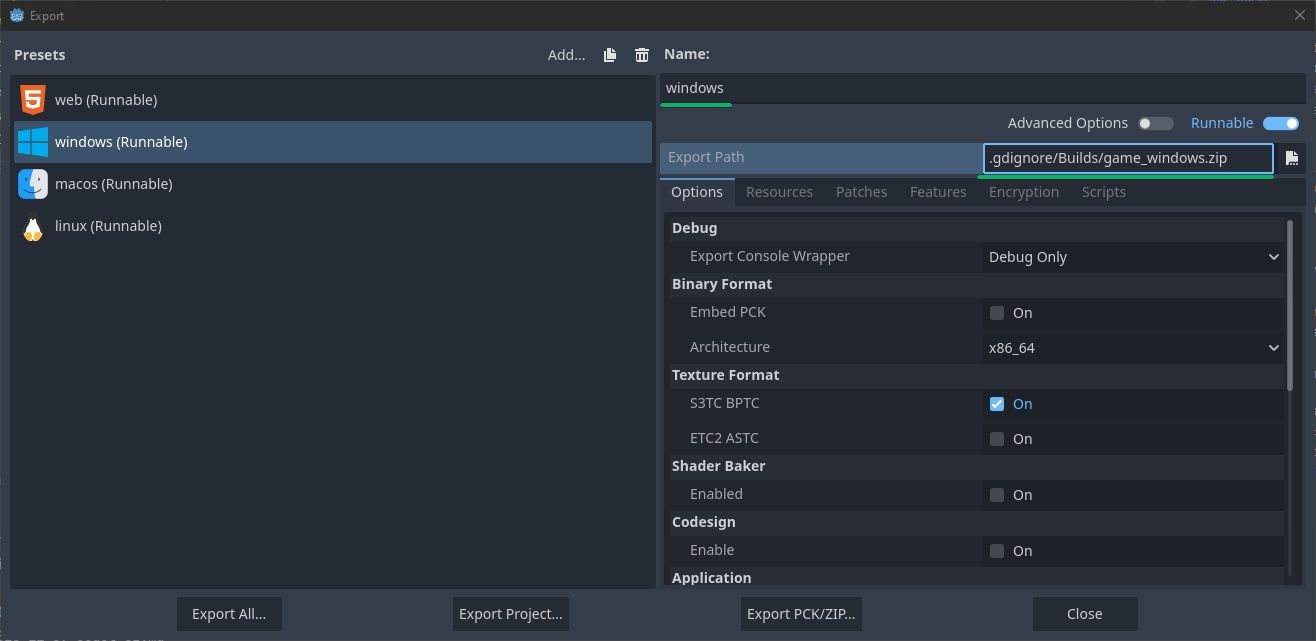
<p>You’ll end up with the configurations for builds. In this case the Windows one is simply titled <strong>windows</strong> and exports 
to <strong>.gdignore/Builds/game_windows.zip</strong>. These two entries are really all that are needed for the pipeline.</p>

<p><a href="/assets/images/godot_ci/export_templates.jpg">
  <img src="/assets/images/godot_ci/export_templates.jpg" alt="" class="full" />
</a></p>

<p>You can now make a build by simply calling</p>
<div class="language-sh highlighter-rouge"><div class="highlight"><pre class="highlight"><code>Godot.exe <span class="nt">--headless</span> <span class="nt">--path</span> <span class="s2">"path/to/project/folder"</span> <span class="nt">--export-release</span> windows
</code></pre></div></div>

<table>
  <thead>
    <tr>
      <th>Argument</th>
      <th>Purpose</th>
    </tr>
  </thead>
  <tbody>
    <tr>
      <td>headless</td>
      <td>(Optional) Runs the engine without the display server, in case the CI node has no gpu</td>
    </tr>
    <tr>
      <td>path</td>
      <td>Path to the folder where the project.godot file is in</td>
    </tr>
    <tr>
      <td>export-release</td>
      <td>Shipping configuration, export-debug is also possible</td>
    </tr>
    <tr>
      <td>windows</td>
      <td>The name of the export configuration, be sure is the same as in the UI</td>
    </tr>
  </tbody>
</table>

<p><br />
You can use this for each export configuration.</p>

<h2 id="deploy">Deploy</h2>
<p>This takes care of building, now onto uploading. You need to install itch’s deployment tool <a href="https://itch.io/docs/butler/">butler</a> and make sure it is 
<a href="https://itch.io/docs/butler/login.html">authenticated</a>. Save the auth in an environment variable named BUTLER_API_KEY.</p>

<p>With that the build can be uploaded like so:</p>
<div class="language-sh highlighter-rouge"><div class="highlight"><pre class="highlight"><code>butler.exe push <span class="s2">"path/to/project/folder/.gdignore/Builds/game_windows.zip"</span> username/game-name:windows
</code></pre></div></div>

<table>
  <thead>
    <tr>
      <th>Argument</th>
      <th>Purpose</th>
    </tr>
  </thead>
  <tbody>
    <tr>
      <td>push</td>
      <td>Tells butler to upload a folder or file</td>
    </tr>
    <tr>
      <td>username</td>
      <td>The username that is authenticated</td>
    </tr>
    <tr>
      <td>game-name</td>
      <td>The identifier of the game</td>
    </tr>
    <tr>
      <td>windows</td>
      <td>Channel name to push build to (<a href="https://itch.io/docs/butler/pushing.html#channel-names">see docs</a>)</td>
    </tr>
  </tbody>
</table>

<p><br /></p>

<h2 id="finished-pipeline">Finished Pipeline</h2>

<p>All that’s left is package the previous calls into a standard jenkins pipeline. Note that the <strong>path/to/project/folder</strong> 
has been replaced with the <strong>WORKSPACE</strong> variable.</p>

<div class="language-groovy highlighter-rouge"><div class="highlight"><pre class="highlight"><code><span class="n">pipeline</span> <span class="o">{</span>
    <span class="n">agent</span> <span class="n">any</span> 
    <span class="n">stages</span> <span class="o">{</span>
        <span class="n">stage</span><span class="o">(</span><span class="s1">'Build'</span><span class="o">)</span> <span class="o">{</span> 
            <span class="n">steps</span> <span class="o">{</span>
                <span class="n">bat</span> <span class="s2">"Godot.exe --headless --path \"${WORKSPACE}\" --export-release windows"</span>
            <span class="o">}</span>
        <span class="o">}</span>
        <span class="n">stage</span><span class="o">(</span><span class="s1">'Deploy'</span><span class="o">)</span> <span class="o">{</span> 
            <span class="n">steps</span> <span class="o">{</span>
                <span class="n">bat</span> <span class="s2">"butler.exe push \"${WORKSPACE}/.gdignore/Builds/game_windows.zip\" username/game-name:windows"</span>
            <span class="o">}</span>
        <span class="o">}</span>
    <span class="o">}</span>
<span class="o">}</span>
</code></pre></div></div>]]></content><author><name>freetimecoder</name></author><category term="Tutorial" /><category term="Code" /><category term="Tutorial" /><category term="Godot" /><summary type="html"><![CDATA[Bare minimum steps to run Godot builds in Jenkins and upload to Itch.io]]></summary></entry><entry><title type="html">P4 Discord Reporter</title><link href="https://freetimecoder.net/tutorial/Perforce-Discord-Reporter/" rel="alternate" type="text/html" title="P4 Discord Reporter" /><published>2025-07-19T00:00:00+02:00</published><updated>2025-07-19T00:00:00+02:00</updated><id>https://freetimecoder.net/tutorial/Perforce-Discord-Reporter</id><content type="html" xml:base="https://freetimecoder.net/tutorial/Perforce-Discord-Reporter/"><![CDATA[<p>How to use Python to send Perforce commit messages to Discord.</p>

<blockquote>

  <h2 id="introduction">Introduction</h2>
  <p>If you just want the finished script you’ll find it at the <a href="#finished-script">end of this article</a>.</p>
</blockquote>

<p>Honestly when I started this task I wasn’t expecting to have to spend so many hours on it. It’s a simple premise after 
all: Whenever someone submits a change to the perforce depot the contents of the submission message should be posted to 
Discord. After all, I’ve created similar integrations for a mix and match between Git, Jenkins, Discord and Slack before. 
Secondly because I expected the use case to be quite common.</p>

<p>Yet I have had a hard time finding out what needed to be done, not least of all because of the “sparse” way the Perforce 
docs are often written. <del>Also all official samples are still in Python 2?!</del></p>

<h2 id="prerequisites">Prerequisites</h2>
<p>This tutorial is written for Python 3. To run the code you’ll need <a href="https://pypi.org/project/p4python">p4python</a> to 
communicate with the server and <a href="https://pypi.org/project/requests/">requests</a> to send data to the webhook.</p>

<p>A working Perforce server that you can add triggers to.</p>

<p>The url for a Discord Webhook. If you don’t have one, check out how to <a href="https://support.discord.com/hc/en-us/articles/228383668-Intro-to-Webhooks">make a webhook</a>.</p>

<h2 id="the-script">The Script</h2>

<p>Most tutorials cover how to connect to P4 like this and then run commands. However, there is a catch, because certain 
command calls will error out either saying the client workspace is invalid, P4PASSWD isn’t set or the session expired.</p>
<div class="language-python highlighter-rouge"><div class="highlight"><pre class="highlight"><code><span class="kn">from</span> <span class="n">P4</span> <span class="kn">import</span> <span class="n">P4</span><span class="p">,</span> <span class="n">P4Exception</span>

<span class="n">p4</span> <span class="o">=</span> <span class="nc">P4</span><span class="p">()</span>

<span class="n">p4</span><span class="p">.</span><span class="n">user</span> <span class="o">=</span> <span class="sh">"</span><span class="s">SomeUsername</span><span class="sh">"</span>
<span class="n">p4</span><span class="p">.</span><span class="n">password</span> <span class="o">=</span> <span class="sh">"</span><span class="s">SomePassword</span><span class="sh">"</span>
<span class="n">p4</span><span class="p">.</span><span class="n">port</span> <span class="o">=</span> <span class="sh">"</span><span class="s">1666</span><span class="sh">"</span>
<span class="n">p4</span><span class="p">.</span><span class="nf">connect</span><span class="p">()</span>
</code></pre></div></div>

<p>To fix all these errors at once you need to call</p>
<div class="language-python highlighter-rouge"><div class="highlight"><pre class="highlight"><code><span class="n">p4</span><span class="p">.</span><span class="nf">run_login</span><span class="p">()</span>
</code></pre></div></div>

<p>Next get the latest change list info. The order of arguments is important.</p>

<table>
  <thead>
    <tr>
      <th>Argument</th>
      <th>Purpose</th>
    </tr>
  </thead>
  <tbody>
    <tr>
      <td>changes</td>
      <td>The command</td>
    </tr>
    <tr>
      <td>-l</td>
      <td>By default commit messages are truncated. This returns the full message</td>
    </tr>
    <tr>
      <td>-m 1</td>
      <td>Get only the latest change</td>
    </tr>
    <tr>
      <td>//depot/…</td>
      <td>The changes command lists only Changelists that affect a given directory or file. <br /> Passing in the whole depot lists all changes</td>
    </tr>
  </tbody>
</table>

<div class="language-python highlighter-rouge"><div class="highlight"><pre class="highlight"><code><span class="n">changes</span> <span class="o">=</span> <span class="n">p4</span><span class="p">.</span><span class="nf">run</span><span class="p">(</span><span class="sh">"</span><span class="s">changes</span><span class="sh">"</span><span class="p">,</span><span class="sh">"</span><span class="s">-l</span><span class="sh">"</span><span class="p">,</span><span class="sh">"</span><span class="s">-m 1</span><span class="sh">"</span><span class="p">,</span> <span class="sh">"</span><span class="s">//depot/...</span><span class="sh">"</span><span class="p">)</span>
</code></pre></div></div>

<p><strong>changes</strong> is a list with one entry. The entry is an object with all the infos from the latest change.</p>
<div class="language-json highlighter-rouge"><div class="highlight"><pre class="highlight"><code><span class="p">[</span><span class="w">
  </span><span class="p">{</span><span class="w">
    </span><span class="nl">"change"</span><span class="p">:</span><span class="w"> </span><span class="s2">"47"</span><span class="p">,</span><span class="w"> 
    </span><span class="nl">"time"</span><span class="p">:</span><span class="w"> </span><span class="s2">"1752951440"</span><span class="p">,</span><span class="w"> 
    </span><span class="nl">"user"</span><span class="p">:</span><span class="w"> </span><span class="s2">"freetimecoder"</span><span class="p">,</span><span class="w"> 
    </span><span class="nl">"client"</span><span class="p">:</span><span class="w"> </span><span class="s2">"freetimecoder_studio_pc"</span><span class="p">,</span><span class="w"> 
    </span><span class="nl">"status"</span><span class="p">:</span><span class="w"> </span><span class="s2">"submitted"</span><span class="p">,</span><span class="w"> 
    </span><span class="nl">"changeType"</span><span class="p">:</span><span class="w"> </span><span class="s2">"public"</span><span class="p">,</span><span class="w"> 
    </span><span class="nl">"path"</span><span class="p">:</span><span class="w"> </span><span class="s2">"//depot/mainline/Tools/P4/*"</span><span class="p">,</span><span class="w"> 
    </span><span class="nl">"desc"</span><span class="p">:</span><span class="w"> </span><span class="s2">"- Added final report python script</span><span class="se">\n</span><span class="s2">"</span><span class="w">
  </span><span class="p">}</span><span class="w">
</span><span class="p">]</span><span class="w">
</span></code></pre></div></div>
<p>So here we store the relevant info for later.</p>
<div class="language-python highlighter-rouge"><div class="highlight"><pre class="highlight"><code><span class="n">clnr</span> <span class="o">=</span> <span class="n">changes</span><span class="p">[</span><span class="mi">0</span><span class="p">][</span><span class="sh">"</span><span class="s">change</span><span class="sh">"</span><span class="p">]</span>
<span class="n">user</span> <span class="o">=</span> <span class="n">changes</span><span class="p">[</span><span class="mi">0</span><span class="p">][</span><span class="sh">"</span><span class="s">user</span><span class="sh">"</span><span class="p">]</span>
<span class="n">desc</span> <span class="o">=</span> <span class="n">changes</span><span class="p">[</span><span class="mi">0</span><span class="p">][</span><span class="sh">"</span><span class="s">desc</span><span class="sh">"</span><span class="p">]</span>
</code></pre></div></div>

<p>Now that we got the info it’s time to send it to Discord. Provided the webhook is active this is as simple as doing a 
json post request to the url.</p>
<div class="language-python highlighter-rouge"><div class="highlight"><pre class="highlight"><code><span class="kn">import</span> <span class="n">requests</span>

<span class="bp">...</span>

<span class="n">data</span> <span class="o">=</span> <span class="p">{</span>
    <span class="sh">"</span><span class="s">content</span><span class="sh">"</span> <span class="p">:</span> <span class="sh">""</span><span class="p">,</span>
    <span class="sh">"</span><span class="s">username</span><span class="sh">"</span> <span class="p">:</span> <span class="sh">"</span><span class="s">Perforce</span><span class="sh">"</span><span class="p">,</span>
    <span class="sh">"</span><span class="s">embeds</span><span class="sh">"</span><span class="p">:</span> <span class="p">[</span>
        <span class="p">{</span>
            <span class="sh">"</span><span class="s">title</span><span class="sh">"</span> <span class="p">:</span> <span class="sa">f</span><span class="sh">"</span><span class="si">{</span><span class="n">user</span><span class="si">}</span><span class="s"> submitted CL-</span><span class="si">{</span><span class="n">clnr</span><span class="si">}</span><span class="sh">"</span><span class="p">,</span>
            <span class="sh">"</span><span class="s">description</span><span class="sh">"</span> <span class="p">:</span> <span class="n">desc</span>
        <span class="p">}</span>
    <span class="p">]</span>
<span class="p">}</span>

<span class="n">result</span> <span class="o">=</span> <span class="n">requests</span><span class="p">.</span><span class="nf">post</span><span class="p">(</span><span class="n">discord_webhook_url</span><span class="p">,</span> <span class="n">json</span> <span class="o">=</span> <span class="n">data</span><span class="p">)</span>
</code></pre></div></div>

<p>Running the script yields a message like this in the designated Discord channel.</p>

<p><a href="/assets/images/p4_discord/discord_message.jpg">
  <img src="/assets/images/p4_discord/discord_message.jpg" alt="A discord message that displays the text 'Test' posted by the perforce app bot." class="full" />
</a></p>

<h2 id="trigger-setup">Trigger Setup</h2>

<p>Now that the script is done, all that’s left is to make Perforce actually execute it. Triggers are made for that. Whenever 
a specific action happens Perforce can execute custom code. To start adding a trigger run this in the terminal:</p>
<div class="language-plaintext highlighter-rouge"><div class="highlight"><pre class="highlight"><code>p4 triggers
</code></pre></div></div>
<p>This will open a text file in the text editor that is configured for Perforce. Scroll way down to the bottom and add</p>
<div class="language-plaintext highlighter-rouge"><div class="highlight"><pre class="highlight"><code>Triggers:
    discord change-commit //depot/... "py /path/to/script/reporter.py"
</code></pre></div></div>

<p>Save and close the file and Perforce should say “Triggers saved.”</p>

<p>The config is composed of these parts:</p>

<table>
  <thead>
    <tr>
      <th>Argument</th>
      <th>Purpose</th>
    </tr>
  </thead>
  <tbody>
    <tr>
      <td>discord</td>
      <td>Unique name of the trigger</td>
    </tr>
    <tr>
      <td>change-commit</td>
      <td>Event to listen for (this one is after the push was successful)</td>
    </tr>
    <tr>
      <td>//depot/…</td>
      <td>Only trigger for changes below this folder path</td>
    </tr>
    <tr>
      <td>“py /path/to/script/reporter.py”</td>
      <td>Command to execute</td>
    </tr>
  </tbody>
</table>

<p><br />
And there you go, pushing a change should now post messages in Discord.
<br />
<br /></p>

<h2 id="finished-script">Finished Script</h2>
<p>The final script has a few more bells and whistles, but essentially works the same. A thing to note is that if you want 
to sync the script inside the repository you need to put the credentials into environment variables or an external config file.</p>
<div class="language-python highlighter-rouge"><div class="highlight"><pre class="highlight"><code><span class="c1">#!/usr/bin/env python3
</span><span class="kn">from</span> <span class="n">P4</span> <span class="kn">import</span> <span class="n">P4</span><span class="p">,</span> <span class="n">P4Exception</span>
<span class="kn">import</span> <span class="n">requests</span>

<span class="c1"># You'll need to change these to fit your setup 
</span><span class="n">p4_user</span> <span class="o">=</span> <span class="sh">"</span><span class="s">SomeUsername</span><span class="sh">"</span>
<span class="n">p4_password</span> <span class="o">=</span> <span class="sh">"</span><span class="s">SomePassword</span><span class="sh">"</span>
<span class="n">p4_port</span> <span class="o">=</span> <span class="sh">"</span><span class="s">server:1666</span><span class="sh">"</span>
<span class="c1"># This is optional depending on your ssl setup
</span><span class="n">p4_fingerprint</span> <span class="o">=</span> <span class="bp">None</span> 
<span class="c1"># What path to watch for changes, in case you have multiple depots
</span><span class="n">p4_depot_path</span> <span class="o">=</span> <span class="sh">"</span><span class="s">//depot/...</span><span class="sh">"</span>
<span class="c1"># Endpoint for the messages
</span><span class="n">discord_webhook_url</span> <span class="o">=</span> <span class="sh">"</span><span class="s">https://discord.com/...</span><span class="sh">"</span>

<span class="n">p4</span> <span class="o">=</span> <span class="nc">P4</span><span class="p">()</span>

<span class="k">try</span><span class="p">:</span>
    <span class="n">p4</span><span class="p">.</span><span class="n">user</span> <span class="o">=</span> <span class="n">p4_user</span>
    <span class="n">p4</span><span class="p">.</span><span class="n">password</span> <span class="o">=</span> <span class="n">p4_password</span>
    <span class="n">p4</span><span class="p">.</span><span class="n">port</span> <span class="o">=</span> <span class="n">p4_port</span>
    <span class="n">p4</span><span class="p">.</span><span class="nf">connect</span><span class="p">()</span>
    <span class="k">if</span> <span class="n">p4_fingerprint</span> <span class="ow">not</span> <span class="bp">None</span><span class="p">:</span>
        <span class="n">p4</span><span class="p">.</span><span class="nf">run_trust</span><span class="p">(</span><span class="sh">"</span><span class="s">-i</span><span class="sh">"</span><span class="p">,</span> <span class="n">p4_fingerprint</span><span class="p">)</span>
    <span class="n">p4</span><span class="p">.</span><span class="nf">run_login</span><span class="p">()</span>
    
    <span class="c1"># Fetch the long description of the latest submission
</span>    <span class="n">changes</span> <span class="o">=</span> <span class="n">p4</span><span class="p">.</span><span class="nf">run</span><span class="p">(</span><span class="sh">"</span><span class="s">changes</span><span class="sh">"</span><span class="p">,</span><span class="sh">"</span><span class="s">-l</span><span class="sh">"</span><span class="p">,</span><span class="sh">"</span><span class="s">-m 1</span><span class="sh">"</span><span class="p">,</span> <span class="n">p4_depot_path</span><span class="p">)</span>

    <span class="c1"># Get the parts of the changelog that interest us for the message
</span>    <span class="n">clnr</span> <span class="o">=</span> <span class="n">changes</span><span class="p">[</span><span class="mi">0</span><span class="p">][</span><span class="sh">"</span><span class="s">change</span><span class="sh">"</span><span class="p">]</span>
    <span class="n">user</span> <span class="o">=</span> <span class="n">changes</span><span class="p">[</span><span class="mi">0</span><span class="p">][</span><span class="sh">"</span><span class="s">user</span><span class="sh">"</span><span class="p">]</span>
    <span class="n">desc</span> <span class="o">=</span> <span class="n">changes</span><span class="p">[</span><span class="mi">0</span><span class="p">][</span><span class="sh">"</span><span class="s">desc</span><span class="sh">"</span><span class="p">]</span>
        
    <span class="c1"># An empty message "from Perforce" with the change list message in an embed
</span>    <span class="n">data</span> <span class="o">=</span> <span class="p">{</span>
        <span class="sh">"</span><span class="s">content</span><span class="sh">"</span> <span class="p">:</span> <span class="sh">""</span><span class="p">,</span>
        <span class="sh">"</span><span class="s">username</span><span class="sh">"</span> <span class="p">:</span> <span class="sh">"</span><span class="s">Perforce</span><span class="sh">"</span><span class="p">,</span>
        <span class="sh">"</span><span class="s">embeds</span><span class="sh">"</span><span class="p">:</span> <span class="p">[</span>
            <span class="p">{</span>
                <span class="sh">"</span><span class="s">title</span><span class="sh">"</span> <span class="p">:</span> <span class="sa">f</span><span class="sh">"</span><span class="si">{</span><span class="n">user</span><span class="si">}</span><span class="s"> submitted CL-</span><span class="si">{</span><span class="n">clnr</span><span class="si">}</span><span class="sh">"</span><span class="p">,</span>
                <span class="sh">"</span><span class="s">description</span><span class="sh">"</span> <span class="p">:</span> <span class="n">desc</span>
            <span class="p">}</span>
        <span class="p">]</span>
    <span class="p">}</span>
    
    <span class="c1"># Send message to Discord
</span>    <span class="n">result</span> <span class="o">=</span> <span class="n">requests</span><span class="p">.</span><span class="nf">post</span><span class="p">(</span><span class="n">discord_webhook_url</span><span class="p">,</span> <span class="n">json</span> <span class="o">=</span> <span class="n">data</span><span class="p">)</span>
    <span class="n">result</span><span class="p">.</span><span class="nf">raise_for_status</span><span class="p">()</span>
    
<span class="k">except</span> <span class="n">P4Exception</span><span class="p">:</span>
    <span class="c1"># Send any P4 errors to Discord and output
</span>    <span class="k">for</span> <span class="n">e</span> <span class="ow">in</span> <span class="n">p4</span><span class="p">.</span><span class="n">errors</span><span class="p">:</span> 
        <span class="n">requests</span><span class="p">.</span><span class="nf">post</span><span class="p">(</span><span class="n">config</span><span class="p">[</span><span class="sh">"</span><span class="s">discord_webhook</span><span class="sh">"</span><span class="p">],</span> <span class="n">json</span> <span class="o">=</span> <span class="p">{</span> <span class="sh">"</span><span class="s">content</span><span class="sh">"</span> <span class="p">:</span> <span class="nf">str</span><span class="p">(</span><span class="n">e</span><span class="p">),</span> <span class="sh">"</span><span class="s">username</span><span class="sh">"</span> <span class="p">:</span> <span class="sh">"</span><span class="s">Perforce</span><span class="sh">"</span><span class="p">})</span>
        <span class="nf">print</span><span class="p">(</span><span class="n">e</span><span class="p">)</span>
<span class="k">except</span> <span class="nb">Exception</span> <span class="k">as</span> <span class="n">e</span><span class="p">:</span>
    <span class="c1"># Send any other exceptions to Discord as well 
</span>    <span class="n">requests</span><span class="p">.</span><span class="nf">post</span><span class="p">(</span><span class="n">config</span><span class="p">[</span><span class="sh">"</span><span class="s">discord_webhook</span><span class="sh">"</span><span class="p">],</span> <span class="n">json</span> <span class="o">=</span> <span class="p">{</span> <span class="sh">"</span><span class="s">content</span><span class="sh">"</span> <span class="p">:</span> <span class="nf">str</span><span class="p">(</span><span class="n">e</span><span class="p">),</span> <span class="sh">"</span><span class="s">username</span><span class="sh">"</span> <span class="p">:</span> <span class="sh">"</span><span class="s">Perforce</span><span class="sh">"</span><span class="p">})</span>
    <span class="nf">print</span><span class="p">(</span><span class="n">e</span><span class="p">)</span>
</code></pre></div></div>

<h2 id="errors">Errors</h2>

<p>Perforce does throw errors, but it’s hard to know what they mean and how to fix them. So I’ve listed all of them down 
here in hopes a search engine might pick up on it.</p>

<div class="warning">
	<div class="row align-items-center">
		<div class="col-md-auto">
			<i class="bi bi-patch-exclamation"></i> 
		</div>
		
		<div class="col">
			-l - must create client 'Computer-Name' to access local files.
		</div>
	</div>
</div>
<p><br />
The -l parameter must be passed in before the depot path</p>

<div class="warning">
	<div class="row align-items-center">
		<div class="col-md-auto">
			<i class="bi bi-patch-exclamation"></i> 
		</div>
		
		<div class="col">
			Perforce password (P4PASSWD) invalid or unset
		</div>
	</div>
</div>
<p><br />
p4.run_login() must be called before running the command</p>

<div class="warning">
	<div class="row align-items-center">
		<div class="col-md-auto">
			<i class="bi bi-patch-exclamation"></i> 
		</div>
		
		<div class="col">
			Your session has expired, please login again.
		</div>
	</div>
</div>
<p><br />
Most tutorial go right to where p4.connect() is called, however p4.run_login() needs to be called before running some commands.</p>]]></content><author><name>freetimecoder</name></author><category term="Tutorial" /><category term="Code" /><category term="Tutorial" /><summary type="html"><![CDATA[How to use Python to send Perforce commit messages to Discord.]]></summary></entry><entry><title type="html">Unreal Essentials 2025</title><link href="https://freetimecoder.net/unreal/Unreal-Essentials-2025/" rel="alternate" type="text/html" title="Unreal Essentials 2025" /><published>2025-02-06T00:00:00+01:00</published><updated>2025-02-06T00:00:00+01:00</updated><id>https://freetimecoder.net/unreal/Unreal-Essentials-2025</id><content type="html" xml:base="https://freetimecoder.net/unreal/Unreal-Essentials-2025/"><![CDATA[<p>So I’ve been working with Unreal for a little while <del>since its 4 beta</del>. And along the way I’ve picked up a lot of 
plugins from the marketplace (now FAB). Some for specific uses, others I’ve essentially got on speed dial. The later 
ones enhance the experience so much I feel like my workflow depends on them now.</p>

<p>And despite my best efforts to talk people’s ears off about them whenever I can there are still people unaware of my 
very specific opinions. So here you go!</p>

<p>Oh, and none of this is sponsored, in fact I bought all the plugins myself.</p>

<h2 id="blueprint-assist">Blueprint Assist</h2>
<p><a href="https://www.fab.com/listings/14d7ba87-a587-406d-9369-ed75fa0a55ed">Get it on FAB</a></p>

<p>Blueprint Assist auto formats Blueprints. It’s a must-have if you are working with Blueprints. I’ve become allergic to
dragging nodes around with my mouse. Just hit F on a node and watch your Blueprint be pretty. I’ve heard complaints that 
it’s not always making it pretty, but that means you can improve the flow of your code.</p>

<video controls="" loop="" autoplay="" class="full">
  <source src="/assets/images/ue_essentials_2025/blueprint_assist.mp4" type="video/mp4" />
  A bunch of messy Blueprint nodes get cleaned up tidily with the push of a button."
</video>

<h2 id="node-graph-assistant">Node Graph Assistant</h2>

<p><a href="https://www.fab.com/listings/525a33bb-9b05-405d-bf3e-42ca990fb31b">Get it on FAB</a></p>

<p>I’d say this is the spiritual little brother of Blueprint Assist. Lots of helpful improvements for wrangling Blueprint 
wires. It also has auto-format capabilities, but I mostly use it for auto-connecting or disconnecting wires.</p>

<p>The plugin has a ton more features, it’s best to check out the documentation.</p>

<video controls="" loop="" autoplay="" class="full">
  <source src="/assets/images/ue_essentials_2025/node_graph_assistant.mp4" type="video/mp4" />
  Showcasing Blueprint node wires being auto connected when nodes come close, easily inserted or deleted."
</video>

<h2 id="le-extended-standard-library">LE Extended Standard Library</h2>

<p><a href="https://www.fab.com/listings/0aadd41b-c02d-4f63-9009-bffad0070ebc">Get it on FAB</a></p>

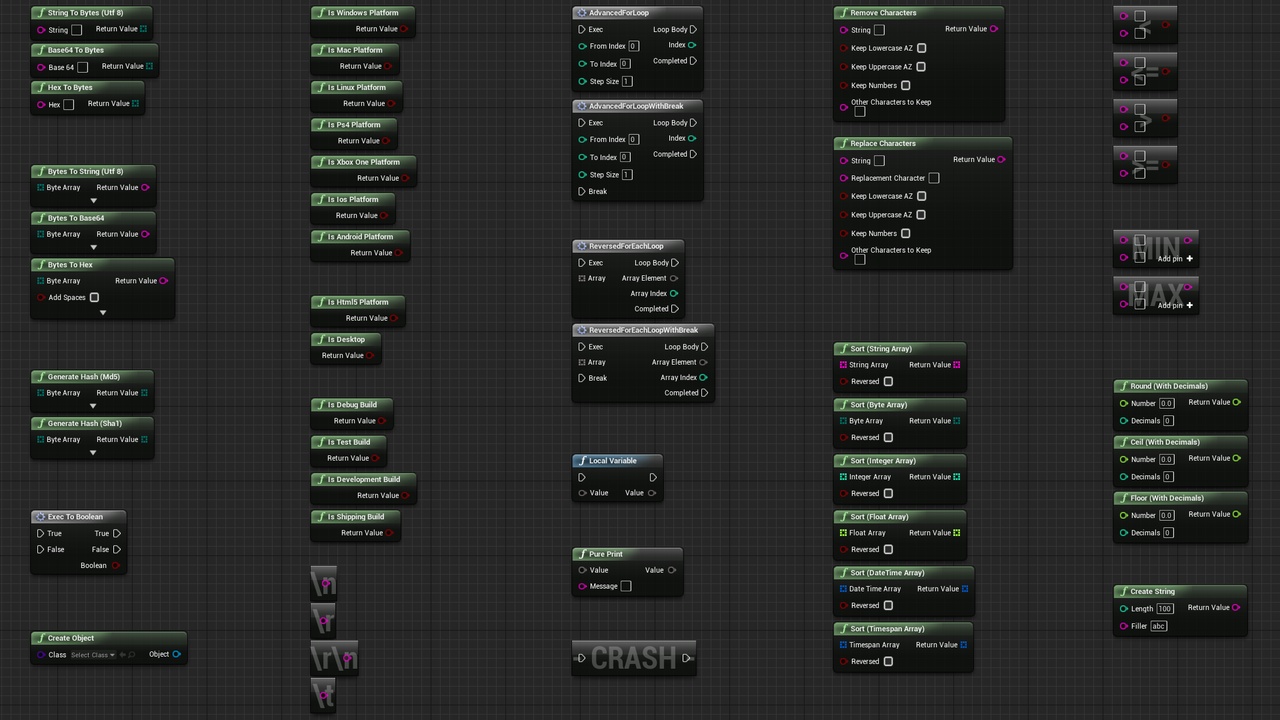
<p>This one is a goodie box of helpful nodes. I’ve been using this since forever, there’s too much to look at in here so 
I’ll encourage you to look at the store page and docs.</p>

<p><a href="/assets/images/ue_essentials_2025/extended_standard_library.jpg">
  <img src="/assets/images/ue_essentials_2025/extended_standard_library.jpg" alt="A lot of blueprint nodes that the plugin offers." class="full" />
</a></p>

<h2 id="auto-size-comments">Auto Size Comments</h2>

<p><a href="https://www.fab.com/listings/fdb7e77d-be37-4feb-a6c9-60e317c10adf">Get it on FAB</a></p>

<p>Does what it says. Instead of dragging comment box borders around to match their contents, this just does it for you.</p>

<video controls="" loop="" autoplay="" class="full">
  <source src="/assets/images/ue_essentials_2025/auto_size_comments.mp4" type="video/mp4" />
  Moving nodes around in the editor wth the comment box auto resizing to fit the nodes."
</video>

<h2 id="blockout-tools">Blockout Tools</h2>

<p><a href="https://www.fab.com/listings/1295806f-f99c-4e98-a686-0619729555db">Get it on FAB</a></p>

<p>Yes I know about the Modeling tools and the Grid Modeler, but for me the Blockout tools are still the quickest and 
easiest way to jot down some level geometry. This plugin contains a variety of different shape builders and mostly uses 
simple base shape meshes, so it won’t bloat your project with custom mesh bits and pieces.</p>

<video controls="" loop="" autoplay="" class="full">
  <source src="/assets/images/ue_essentials_2025/blockout_tools.mp4" type="video/mp4" />
  Dragging some boxes and other shapes into the level."
</video>
<p>~~</p>]]></content><author><name>freetimecoder</name></author><category term="Unreal" /><category term="Unreal" /><category term="Code" /><summary type="html"><![CDATA[Unreal plugins I can't live without.]]></summary></entry><entry><title type="html">Custom Thumbnails</title><link href="https://freetimecoder.net/unreal/Custom-Asset-Thumbnails/" rel="alternate" type="text/html" title="Custom Thumbnails" /><published>2025-01-15T00:00:00+01:00</published><updated>2025-01-15T00:00:00+01:00</updated><id>https://freetimecoder.net/unreal/Custom-Asset-Thumbnails</id><content type="html" xml:base="https://freetimecoder.net/unreal/Custom-Asset-Thumbnails/"><![CDATA[<p>This article is in part tutorial and in part, so I don’t forget all the different ways in which assets can get custom thumbnails in Unreal. (It already happened a few times) If I come across more ways to do it I’ll expand this article.</p>

<h2 id="capture-thumbnail">Capture Thumbnail</h2>

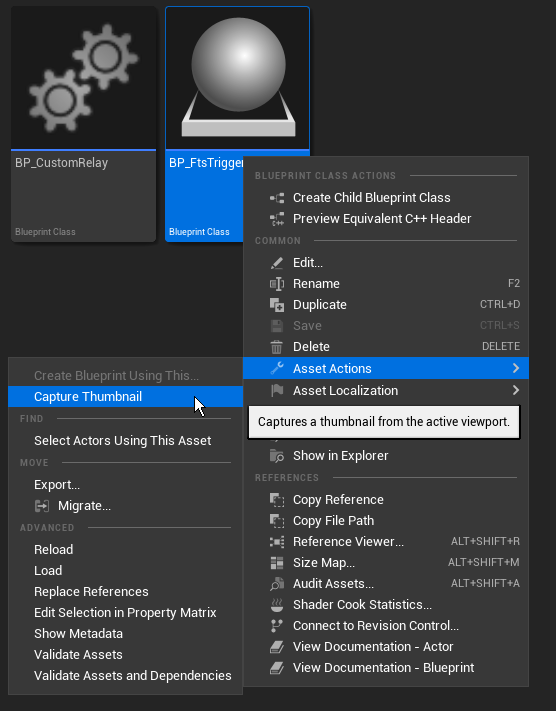
<p>This one is the easiest, but also entirely manual. In Unreal simply right-click on an asset and choose Asset Actions -&gt; Capture Thumbnail. This will take a screenshot of the current level viewport and make it the asset’s thumbnail.</p>

<p><a href="/assets/images/ue_asset_thumbnails/capture_thumbnail.png">
  <img src="/assets/images/ue_asset_thumbnails/capture_thumbnail.png" alt="Right-clicking on a Blueprint and selecting the Capture Thumbnail option." class="full" />
</a></p>

<h2 id="class-icon--class-thumbnail">Class Icon / Class Thumbnail</h2>

<p>To create a default thumbnail like Unreal does for Bluperints or Data Assets you’ll need an editor slate style. There’s a good article on creating and using slate styles on <a href="https://minifloppy.it/posts/2023/how-to-style-slate-widgets-using-stylesets/">Minifloppy.it</a>, so I’m only going to cover the important section here. Unreal will also generate a boilerplate style if you create a new editor mode plugin via the plugin window.</p>

<p>The important part is to set Brushes in the format ClassIcon.ClassName and ClassThumbnail.ClassName and assign .png or .svg files. The code below loads MyPlugin/Resources/myclass_icon.png which is 16 by 16 pixels and MyPlugin/Resources/myclass_thumbnail.svg.</p>

<p>Though SVGs are vector graphics Unreal code always passes along a 64 size. Inspecting the code reveals that it goes into the FDeprecateSlateVector2D structure, so maybe it’s no longer needed. I’ve not delved further into the code to find out so I’ll keep it for now.</p>

<div class="language-cpp highlighter-rouge"><div class="highlight"><pre class="highlight"><code><span class="n">TSharedRef</span><span class="o">&lt;</span> <span class="n">FSlateStyleSet</span> <span class="o">&gt;</span> <span class="n">FMyPluginEditorStyle</span><span class="o">::</span><span class="n">Create</span><span class="p">()</span>
<span class="p">{</span>
	<span class="c1">// This is how Unreal code does it for sizes, as far as I know there's only 16, 20 and 64</span>
	<span class="k">const</span> <span class="n">FVector2D</span> <span class="n">Icon16x16</span><span class="p">(</span><span class="mf">16.0</span><span class="n">f</span><span class="p">,</span> <span class="mf">16.0</span><span class="n">f</span><span class="p">);</span>
	<span class="k">const</span> <span class="n">FVector2D</span> <span class="n">Icon64x64</span><span class="p">(</span><span class="mf">64.0</span><span class="n">f</span><span class="p">,</span> <span class="mf">64.0</span><span class="n">f</span><span class="p">);</span>

	<span class="n">TSharedRef</span><span class="o">&lt;</span> <span class="n">FSlateStyleSet</span> <span class="o">&gt;</span> <span class="n">Style</span> <span class="o">=</span> <span class="n">MakeShareable</span><span class="p">(</span><span class="k">new</span> <span class="n">FSlateStyleSet</span><span class="p">(</span><span class="s">"MyPluginEditorStyle"</span><span class="p">));</span>
	
	<span class="c1">// Set the content root of the style to the plugins resource directory</span>
	<span class="n">Style</span><span class="o">-&gt;</span><span class="n">SetContentRoot</span><span class="p">(</span><span class="n">IPluginManager</span><span class="o">::</span><span class="n">Get</span><span class="p">().</span><span class="n">FindPlugin</span><span class="p">(</span><span class="s">"MyPlugin"</span><span class="p">)</span><span class="o">-&gt;</span><span class="n">GetBaseDir</span><span class="p">()</span> <span class="o">/</span> <span class="n">TEXT</span><span class="p">(</span><span class="s">"Resources"</span><span class="p">));</span>

	<span class="c1">// Loads a png image as a class icon for UMyClass or AMyClass</span>
	<span class="n">Style</span><span class="o">-&gt;</span><span class="n">Set</span><span class="p">(</span><span class="s">"ClassIcon.MyClass"</span><span class="p">,</span> <span class="k">new</span> <span class="n">IMAGE_BRUSH</span><span class="p">(</span><span class="n">TEXT</span><span class="p">(</span><span class="s">"myclass_icon"</span><span class="p">),</span> <span class="n">Icon16x16</span><span class="p">));</span>

	<span class="c1">// Loads an svg image as a thumbnail icon for UMyClass or AMyClass</span>
	<span class="n">Style</span><span class="o">-&gt;</span><span class="n">Set</span><span class="p">(</span><span class="s">"ClassThumbnail.MyClass"</span><span class="p">,</span> <span class="k">new</span> <span class="n">IMAGE_BRUSH_SVG</span><span class="p">(</span><span class="n">TEXT</span><span class="p">(</span><span class="s">"myclass_thumbnail"</span><span class="p">),</span> <span class="n">Icon64x64</span><span class="p">));</span>
	<span class="k">return</span> <span class="n">Style</span><span class="p">;</span>
<span class="p">}</span>
</code></pre></div></div>

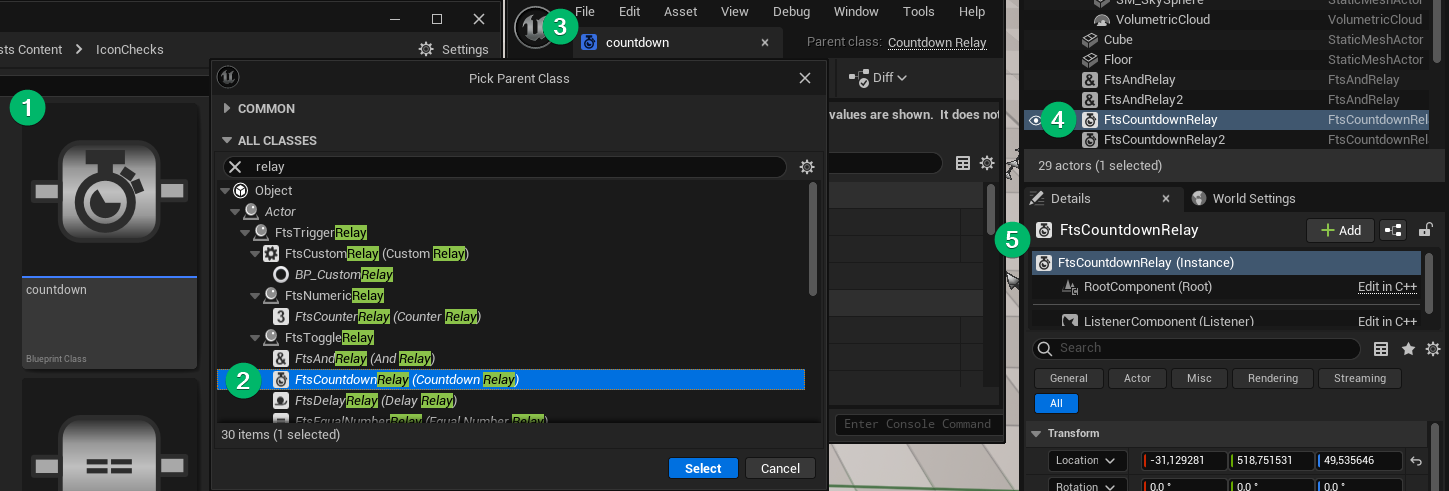
<p>Thumbnails appear in the content browser (1) and class icons just about everywhere else (2 - 5).</p>

<p><a href="/assets/images/ue_asset_thumbnails/thumbnails_and_icons.png">
  <img src="/assets/images/ue_asset_thumbnails/thumbnails_and_icons.png" alt="Different editor windows displaying custom icons for objects." class="full" />
</a></p>

<p>Style wise I’ve observed that Unreal’s thumbnails always have an empty background and border around them. If the image has no borders it <em>almost</em> fills the entire thumbnail, but leaves a few pixels free. Personally I’d recommend to always keep some space.</p>

<p>Class icons should always be in greyscale, but even better in black and white since they get tinted differently all over the place.</p>

<p><a href="/assets/images/ue_asset_thumbnails/border.png">
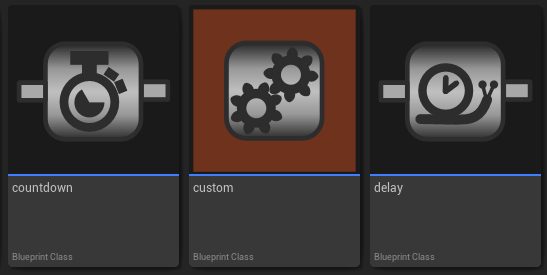
  <img src="/assets/images/ue_asset_thumbnails/border.png" alt="Three custom icons in the content browser. The middle one has a brown background to showcase Unreals enforced borders." class="full" />
</a></p>

<h2 id="custom-thumbnail-renderer">Custom Thumbnail Renderer</h2>

<p>This approach is arguably the most versatile but also most complicated. Some assets like Textures or Meshes get thumbnails based on their content. In order to do this there is a class called <strong>UThumbnailRenderer</strong> (or it’s more often used derived class UDefaultSizedThumbnailRenderer) which allows the thumbnail size to be set via config. The main methods to override are <strong>CanVisualizeAsset</strong> and <strong>Draw</strong>. In order for the renderer to be used it needs to be registered with the <strong>UThumbnailManager</strong>.</p>

<p>CanVisualizeAsset gets given the loaded asset before any rendering takes place. Returning true continues the render process, false aborts and the thumbnail stays empty.</p>

<p>Draw is where the actual thumbnail texture is being rendered. In my use case the thumbnail simply draws a background, the icon of a data asset and a tag text to show it’s a recipe.</p>

<p>Here’s the header for a custom thumbnail renderer for Recipe Data Assets in Garden Witch Life:</p>

<div class="language-cpp highlighter-rouge"><div class="highlight"><pre class="highlight"><code><span class="cp">#pragma once
</span>
<span class="cp">#include</span> <span class="cpf">"ThumbnailRendering/DefaultSizedThumbnailRenderer.h"</span><span class="cp">
#include</span> <span class="cpf">"GWLRecipeAssetThumbnailRenderer.generated.h"</span><span class="cp">
</span>
<span class="cm">/**
 * Thumbnail renderer for Recipe Assets
 */</span>
<span class="n">UCLASS</span><span class="p">()</span>
<span class="k">class</span> <span class="nc">GARDENWITCHLIFEEDITOR_API</span> <span class="n">UGWLRecipeAssetThumbnailRenderer</span> <span class="o">:</span> <span class="k">public</span> <span class="n">UDefaultSizedThumbnailRenderer</span>
<span class="p">{</span>
	<span class="n">GENERATED_BODY</span><span class="p">()</span>

<span class="nl">public:</span>
	<span class="k">virtual</span> <span class="kt">bool</span> <span class="n">CanVisualizeAsset</span><span class="p">(</span><span class="n">UObject</span><span class="o">*</span> <span class="n">Object</span><span class="p">)</span> <span class="k">override</span><span class="p">;</span>
	<span class="k">virtual</span> <span class="kt">void</span> <span class="n">Draw</span><span class="p">(</span><span class="n">UObject</span><span class="o">*</span> <span class="n">Object</span><span class="p">,</span> <span class="n">int32</span> <span class="n">X</span><span class="p">,</span> <span class="n">int32</span> <span class="n">Y</span><span class="p">,</span> <span class="n">uint32</span> <span class="n">Width</span><span class="p">,</span> <span class="n">uint32</span> <span class="n">Height</span><span class="p">,</span> <span class="n">FRenderTarget</span><span class="o">*</span> <span class="n">Viewport</span><span class="p">,</span> <span class="n">FCanvas</span><span class="o">*</span> <span class="n">Canvas</span><span class="p">,</span> <span class="kt">bool</span> <span class="n">bAdditionalViewFamily</span><span class="p">)</span> <span class="k">override</span><span class="p">;</span>
<span class="p">};</span>

</code></pre></div></div>

<p>And the Implementation:</p>

<div class="language-cpp highlighter-rouge"><div class="highlight"><pre class="highlight"><code><span class="cp">#include</span> <span class="cpf">"GWLRecipeAssetThumbnailRenderer.h"</span><span class="cp">
#include</span> <span class="cpf">"Crafting/GWLRecipeDataAsset.h"</span><span class="cp">
#include</span> <span class="cpf">"CanvasItem.h"</span><span class="cp">
#include</span> <span class="cpf">"CanvasTypes.h"</span><span class="cp">
#include</span> <span class="cpf">"ThumbnailRendering/ThumbnailManager.h"</span><span class="cp">
</span>
<span class="kt">bool</span> <span class="n">UGWLRecipeAssetThumbnailRenderer</span><span class="o">::</span><span class="n">CanVisualizeAsset</span><span class="p">(</span><span class="n">UObject</span><span class="o">*</span> <span class="n">Object</span><span class="p">)</span>
<span class="p">{</span>
	<span class="c1">// Only render thumbnail for recipes that have a valid icon</span>
	<span class="k">if</span><span class="p">(</span><span class="k">const</span> <span class="k">auto</span> <span class="n">Recipe</span> <span class="o">=</span> <span class="n">Cast</span><span class="o">&lt;</span><span class="n">UGWLRecipeDataAsset</span><span class="o">&gt;</span><span class="p">(</span><span class="n">Object</span><span class="p">))</span>
	<span class="p">{</span>
		<span class="k">if</span><span class="p">(</span><span class="n">Recipe</span><span class="o">-&gt;</span><span class="n">Icon</span><span class="p">.</span><span class="n">LoadSynchronous</span><span class="p">())</span>
		<span class="p">{</span>
			<span class="k">return</span> <span class="nb">true</span><span class="p">;</span>
		<span class="p">}</span>
	<span class="p">}</span>
	
	<span class="k">return</span> <span class="nb">false</span><span class="p">;</span>
<span class="p">}</span>

<span class="kt">void</span> <span class="n">UGWLRecipeAssetThumbnailRenderer</span><span class="o">::</span><span class="n">Draw</span><span class="p">(</span><span class="n">UObject</span><span class="o">*</span> <span class="n">Object</span><span class="p">,</span> <span class="n">int32</span> <span class="n">X</span><span class="p">,</span> <span class="n">int32</span> <span class="n">Y</span><span class="p">,</span> <span class="n">uint32</span> <span class="n">Width</span><span class="p">,</span> <span class="n">uint32</span> <span class="n">Height</span><span class="p">,</span>
											<span class="n">FRenderTarget</span><span class="o">*</span> <span class="n">Viewport</span><span class="p">,</span> <span class="n">FCanvas</span><span class="o">*</span> <span class="n">Canvas</span><span class="p">,</span> <span class="kt">bool</span> <span class="n">bAdditionalViewFamily</span><span class="p">)</span>
<span class="p">{</span>
	<span class="k">const</span> <span class="n">UGWLRecipeDataAsset</span><span class="o">*</span> <span class="n">Recipe</span> <span class="o">=</span> <span class="n">Cast</span><span class="o">&lt;</span><span class="n">UGWLRecipeDataAsset</span><span class="o">&gt;</span><span class="p">(</span><span class="n">Object</span><span class="p">);</span>
	<span class="k">const</span> <span class="n">UTexture2D</span><span class="o">*</span> <span class="n">RecipeIcon</span> <span class="o">=</span> <span class="n">Recipe</span><span class="o">-&gt;</span><span class="n">Icon</span><span class="p">.</span><span class="n">LoadSynchronous</span><span class="p">();</span>
	
	<span class="c1">// Draw a checkerboard background</span>
	<span class="k">constexpr</span> <span class="n">int32</span> <span class="n">CheckerDensity</span> <span class="o">=</span> <span class="mi">8</span><span class="p">;</span>
	<span class="k">const</span> <span class="k">auto</span> <span class="n">Checker</span> <span class="o">=</span> <span class="n">UThumbnailManager</span><span class="o">::</span><span class="n">Get</span><span class="p">().</span><span class="n">CheckerboardTexture</span><span class="p">;</span>
	<span class="n">Canvas</span><span class="o">-&gt;</span><span class="n">DrawTile</span><span class="p">(</span>
		<span class="mf">0.0</span><span class="n">f</span><span class="p">,</span> <span class="mf">0.0</span><span class="n">f</span><span class="p">,</span> <span class="n">Width</span><span class="p">,</span> <span class="n">Height</span><span class="p">,</span> <span class="c1">// Dimensions</span>
		<span class="mf">0.0</span><span class="n">f</span><span class="p">,</span> <span class="mf">0.0</span><span class="n">f</span><span class="p">,</span> <span class="n">CheckerDensity</span><span class="p">,</span> <span class="n">CheckerDensity</span><span class="p">,</span> <span class="c1">// UVs</span>
		<span class="n">FLinearColor</span><span class="o">::</span><span class="n">Gray</span><span class="p">,</span> <span class="n">Checker</span><span class="o">-&gt;</span><span class="n">GetResource</span><span class="p">());</span> <span class="c1">// Tint &amp; Texture</span>

	<span class="c1">// Draw the recipe's icon centered and filling out the thumbnail</span>
	<span class="n">FCanvasTileItem</span> <span class="n">CanvasTile</span><span class="p">(</span><span class="n">FVector2D</span><span class="p">(</span><span class="n">X</span><span class="p">,</span> <span class="n">Y</span><span class="p">),</span> <span class="n">RecipeIcon</span><span class="o">-&gt;</span><span class="n">GetResource</span><span class="p">(),</span> <span class="n">FVector2D</span><span class="p">(</span><span class="n">Width</span><span class="p">,</span> <span class="n">Height</span><span class="p">),</span> <span class="n">FLinearColor</span><span class="o">::</span><span class="n">White</span><span class="p">);</span>
	<span class="n">CanvasTile</span><span class="p">.</span><span class="n">BlendMode</span> <span class="o">=</span> <span class="n">SE_BLEND_Translucent</span><span class="p">;</span>
	<span class="n">CanvasTile</span><span class="p">.</span><span class="n">Draw</span><span class="p">(</span><span class="n">Canvas</span><span class="p">);</span>

	<span class="c1">// Figure out how big the rendered text would be</span>
	<span class="k">auto</span> <span class="n">RecipeChars</span> <span class="o">=</span> <span class="n">TEXT</span><span class="p">(</span><span class="s">"Recipe"</span><span class="p">);</span>
	<span class="n">int32</span> <span class="n">RecipeTextWidth</span> <span class="o">=</span> <span class="mi">0</span><span class="p">;</span>
	<span class="n">int32</span> <span class="n">RecipeHeight</span> <span class="o">=</span> <span class="mi">0</span><span class="p">;</span>
	<span class="n">StringSize</span><span class="p">(</span><span class="n">GEngine</span><span class="o">-&gt;</span><span class="n">GetLargeFont</span><span class="p">(),</span> <span class="n">RecipeTextWidth</span><span class="p">,</span> <span class="n">RecipeHeight</span><span class="p">,</span> <span class="n">RecipeChars</span><span class="p">);</span>
	<span class="kt">float</span> <span class="n">PaddingX</span> <span class="o">=</span> <span class="n">Width</span> <span class="o">/</span> <span class="mf">128.0</span><span class="n">f</span><span class="p">;</span>
	<span class="kt">float</span> <span class="n">PaddingY</span> <span class="o">=</span> <span class="n">Height</span> <span class="o">/</span> <span class="mf">128.0</span><span class="n">f</span><span class="p">;</span>
	<span class="kt">float</span> <span class="n">ScaleX</span> <span class="o">=</span> <span class="n">Width</span> <span class="o">/</span> <span class="mf">64.0</span><span class="n">f</span><span class="p">;</span> <span class="c1">//Text is 1/64'th of the size of the thumbnails</span>
	<span class="kt">float</span> <span class="n">ScaleY</span> <span class="o">=</span> <span class="n">Height</span> <span class="o">/</span> <span class="mf">64.0</span><span class="n">f</span><span class="p">;</span>

	<span class="c1">// Draw the "Recipe" overlay text</span>
	<span class="n">FCanvasTextItem</span> <span class="n">TextItem</span><span class="p">(</span><span class="n">FVector2D</span><span class="p">(</span><span class="n">Width</span> <span class="o">-</span> <span class="n">PaddingX</span> <span class="o">-</span> <span class="n">RecipeTextWidth</span> <span class="o">*</span> <span class="n">ScaleX</span><span class="p">,</span> <span class="n">Height</span> <span class="o">-</span> <span class="n">PaddingY</span> <span class="o">-</span> <span class="n">RecipeHeight</span> <span class="o">*</span> <span class="n">ScaleY</span><span class="p">),</span> <span class="n">FText</span><span class="o">::</span><span class="n">FromString</span><span class="p">(</span><span class="n">RecipeChars</span><span class="p">),</span> <span class="n">GEngine</span><span class="o">-&gt;</span><span class="n">GetLargeFont</span><span class="p">(),</span> <span class="n">FLinearColor</span><span class="o">::</span><span class="n">White</span><span class="p">);</span>
	<span class="n">TextItem</span><span class="p">.</span><span class="n">EnableShadow</span><span class="p">(</span><span class="n">FLinearColor</span><span class="o">::</span><span class="n">Black</span><span class="p">);</span>
	<span class="n">TextItem</span><span class="p">.</span><span class="n">Scale</span> <span class="o">=</span> <span class="n">FVector2D</span><span class="p">(</span><span class="n">ScaleX</span><span class="p">,</span> <span class="n">ScaleY</span><span class="p">);</span>
	<span class="n">TextItem</span><span class="p">.</span><span class="n">Draw</span><span class="p">(</span><span class="n">Canvas</span><span class="p">);</span>
<span class="p">}</span>
</code></pre></div></div>

<p>In order for the thumbnail renderer to be called by Unreal it needs to be registered, preferrably on module startup.</p>

<div class="language-cpp highlighter-rouge"><div class="highlight"><pre class="highlight"><code><span class="cp">#include</span> <span class="cpf">"ThumbnailRendering/ThumbnailManager.h"</span><span class="cp">
</span>
<span class="kt">void</span> <span class="n">FGardenWitchLifeEditorModule</span><span class="o">::</span><span class="n">StartupModule</span><span class="p">()</span>
<span class="p">{</span>
    <span class="n">UThumbnailManager</span><span class="o">::</span><span class="n">Get</span><span class="p">().</span><span class="n">RegisterCustomRenderer</span><span class="p">(</span><span class="n">UGWLRecipeDataAsset</span><span class="o">::</span><span class="n">StaticClass</span><span class="p">(),</span> <span class="n">UGWLRecipeAssetThumbnailRenderer</span><span class="o">::</span><span class="n">StaticClass</span><span class="p">());</span>
<span class="p">}</span>
</code></pre></div></div>

<p>And now it’s doing its job:</p>

<p><a href="/assets/images/ue_asset_thumbnails/thumbnail_renderer_data_assets.png">
  <img src="/assets/images/ue_asset_thumbnails/thumbnail_renderer_data_assets.png" alt="Recipe data assets in the content browser showing custom thumbnails." class="full" />
</a></p>

<h2 id="custom-thumbnail-renderer-for-blueprints">Custom Thumbnail Renderer (for Blueprints)</h2>

<p>Sadly this approach doesn’t work for Blueprints. Registering a thumbnail renderer for AMyActor wouldn’t work, because Unreal wraps all Blueprint assets into UBlueprints and there already is a <strong>UBlueprintThumbnailRenderer</strong>. In order to solve this, a new renderer can be injected. Thanks to <a href="https://forums.unrealengine.com/t/custom-thumbnail-on-blueprint/337532/3">@Schadek on the Unreal Forums</a> for this solution!</p>

<div class="warning">
	<div class="row align-items-center">
		<div class="col-md-auto">
			<i class="bi bi-patch-exclamation"></i> 
		</div>
		
		<div class="col">
			This solution might have unforseen consequences and would only work with one renderer. There cannot be multiple alternative blueprint thumbnail renderers at the same time.
		</div>
	</div>
</div>
<p><br /></p>

<p>The trick is to derive from UBlueprintThumbnailRenderer and replace it with the derived class.</p>

<div class="language-cpp highlighter-rouge"><div class="highlight"><pre class="highlight"><code>
<span class="c1">// GWLBlueprintThumbnailRenderer.h</span>

<span class="cp">#include</span> <span class="cpf">"ThumbnailRendering/BlueprintThumbnailRenderer.h"</span><span class="cp">
</span><span class="k">class</span> <span class="nc">UGWLBlueprintThumbnailRenderer</span> <span class="o">:</span> <span class="k">public</span> <span class="n">UBlueprintThumbnailRenderer</span>


<span class="c1">// GardenWitchLifeEditorModule.cpp</span>

<span class="kt">void</span> <span class="n">FGardenWitchLifeEditorModule</span><span class="o">::</span><span class="n">StartupModule</span><span class="p">()</span>
<span class="p">{</span>
	<span class="c1">// Unregister default renderer</span>
 	<span class="n">UThumbnailManager</span><span class="o">::</span><span class="n">Get</span><span class="p">().</span><span class="n">UnregisterCustomRenderer</span><span class="p">(</span><span class="n">UBlueprint</span><span class="o">::</span><span class="n">StaticClass</span><span class="p">());</span>
	
	<span class="c1">// Register our custom renderer instead</span>
	<span class="n">UThumbnailManager</span><span class="o">::</span><span class="n">Get</span><span class="p">().</span><span class="n">RegisterCustomRenderer</span><span class="p">(</span><span class="n">UBlueprint</span><span class="o">::</span><span class="n">StaticClass</span><span class="p">(),</span> <span class="n">UGWLBlueprintThumbnailRenderer</span><span class="o">::</span><span class="n">StaticClass</span><span class="p">());</span>
<span class="p">}</span>
</code></pre></div></div>

<p>and that’s it!</p>

<p>Ok one last thing, the Draw method gets the UBlueprint passed in as the Object to draw, not the native class. To get the actual default object and native class there’s some more work required.</p>

<div class="language-cpp highlighter-rouge"><div class="highlight"><pre class="highlight"><code><span class="kt">void</span> <span class="n">UMisBlueprintThumbnailRenderer</span><span class="o">::</span><span class="n">Draw</span><span class="p">(</span><span class="n">UObject</span><span class="o">*</span> <span class="n">Object</span><span class="p">,</span> <span class="n">int32</span> <span class="n">X</span><span class="p">,</span> <span class="n">int32</span> <span class="n">Y</span><span class="p">,</span> <span class="n">uint32</span> <span class="n">Width</span><span class="p">,</span> <span class="n">uint32</span> <span class="n">Height</span><span class="p">,</span> <span class="n">FRenderTarget</span><span class="o">*</span> <span class="n">RenderTarget</span><span class="p">,</span> <span class="n">FCanvas</span><span class="o">*</span> <span class="n">Canvas</span><span class="p">,</span> <span class="kt">bool</span> <span class="n">bAdditionalViewFamily</span><span class="p">)</span>
<span class="p">{</span>
	<span class="k">const</span> <span class="n">UBlueprint</span><span class="o">*</span> <span class="n">Blueprint</span> <span class="o">=</span> <span class="n">Cast</span><span class="o">&lt;</span><span class="n">UBlueprint</span><span class="o">&gt;</span><span class="p">(</span><span class="n">Object</span><span class="p">);</span>
	<span class="k">if</span> <span class="p">(</span><span class="n">Blueprint</span><span class="p">)</span>
	<span class="p">{</span>
		<span class="k">const</span> <span class="n">UClass</span><span class="o">*</span> <span class="n">GeneratedClass</span> <span class="o">=</span> <span class="n">Blueprint</span><span class="o">-&gt;</span><span class="n">GeneratedClass</span><span class="p">;</span>
		<span class="k">if</span> <span class="p">(</span><span class="n">Blueprint</span><span class="o">-&gt;</span><span class="n">GeneratedClass</span><span class="o">-&gt;</span><span class="n">IsChildOf</span><span class="p">(</span><span class="n">AMyActor</span><span class="o">::</span><span class="n">StaticClass</span><span class="p">()))</span>
		<span class="p">{</span>
			<span class="k">if</span> <span class="p">(</span><span class="k">const</span> <span class="n">AMyActor</span><span class="o">*</span> <span class="n">CDO</span> <span class="o">=</span> <span class="n">Class</span><span class="o">-&gt;</span><span class="n">GetDefaultObject</span><span class="o">&lt;</span><span class="n">AMyActor</span><span class="o">&gt;</span><span class="p">())</span>
			<span class="p">{</span>
				<span class="c1">// Do rendering</span>
				<span class="k">return</span><span class="p">;</span>
			<span class="p">}</span>
		<span class="p">}</span>
	<span class="p">}</span>

	<span class="c1">// Fall back to original renderer</span>
	<span class="n">Super</span><span class="o">::</span><span class="n">Draw</span><span class="p">(</span><span class="n">Object</span><span class="p">,</span> <span class="n">X</span><span class="p">,</span> <span class="n">Y</span><span class="p">,</span> <span class="n">Width</span><span class="p">,</span> <span class="n">Height</span><span class="p">,</span> <span class="n">RenderTarget</span><span class="p">,</span> <span class="n">Canvas</span><span class="p">,</span> <span class="n">bAdditionalViewFamily</span><span class="p">);</span>
<span class="p">}</span>
</code></pre></div></div>]]></content><author><name>freetimecoder</name></author><category term="Unreal" /><category term="Unreal" /><category term="Code" /><category term="Tutorial" /><summary type="html"><![CDATA[All the ways to render custom thumbnails in unreal.]]></summary></entry><entry><title type="html">Project Toolbar Button</title><link href="https://freetimecoder.net/unreal/Project-Toolbar-Button/" rel="alternate" type="text/html" title="Project Toolbar Button" /><published>2024-08-16T00:00:00+02:00</published><updated>2024-08-16T00:00:00+02:00</updated><id>https://freetimecoder.net/unreal/Project-Toolbar-Button</id><content type="html" xml:base="https://freetimecoder.net/unreal/Project-Toolbar-Button/"><![CDATA[<p>Since Unreal’s Editor Widget Blueprints were introduced the barrier to entry for custom tooling has significantly decreased compared to writing C++ Editor Slate code. I’ve created a sizable collection of different custom editors and helper widgets for the various projects I’m working on. Most of them are highly specific to make editing custom asset types easier.</p>

<p>However, with the number of widgets increasing it also starts to become more and more frustrating to find and launch them via Right Click -&gt; Run Widget. So what better way to offload that than into another editor widget? So I’ve created a button collection widget where each button launches one of the other widgets.</p>

<p>Still I found myself opening and closing that window a lot. Launching one widget instead of many was less fun than I had hoped. So what about putting it in the editor toolbar?</p>

<p><br /></p>

<h2 id="creating-the-toolbar-button">Creating the Toolbar Button</h2>

<p>This step is actually quite easy since Unreal’s plugin creation wizard already gives us all the boilerplate code. We simply go to <strong>Edit -&gt; Plugins</strong> and click the <strong>Add</strong> button. Then choose <strong>Editor Toolbar Button</strong> and name it something like MyEditorTools and click <strong>Create Plugin</strong>.</p>

<p><a href="/assets/images/EditorTools_NewPlugin.png">
  <img src="/assets/images/EditorTools_NewPlugin.png" alt="Step by step clicking the new plugin button, then selecting the toolbar button preset and finally the create button." class="full" />
</a></p>

<p><br /></p>

<p>Tada! After the code is compiled we’ll have a fresh toolbar button.</p>

<p><a href="/assets/images/EditorTools_ToolbarIcon.png">
  <img src="/assets/images/EditorTools_ToolbarIcon.png" alt="Screenshot of the placeholder tool button on the Unreal Editor Toolbar" class="full" />
</a></p>

<p><br /></p>

<h2 id="running-the-editor-widget">Running the Editor Widget</h2>

<p>When the button is clicked it pops up a little notification that tells us how to change its behavior. The button calls a function named PluginButtonClicked in MyEditorTools.cpp. This is where we’ll open our editor widget.</p>
<div class="language-cpp highlighter-rouge"><div class="highlight"><pre class="highlight"><code><span class="kt">void</span> <span class="n">FMyEditorToolsModule</span><span class="o">::</span><span class="n">PluginButtonClicked</span><span class="p">()</span>
<span class="p">{</span>
	<span class="c1">// Put your "OnButtonClicked" stuff here</span>
	<span class="n">FText</span> <span class="n">DialogText</span> <span class="o">=</span> <span class="n">FText</span><span class="o">::</span><span class="n">Format</span><span class="p">(</span>
					<span class="n">LOCTEXT</span><span class="p">(</span><span class="s">"PluginButtonDialogText"</span><span class="p">,</span> <span class="s">"Add code to {0} in {1} to override this button's actions"</span><span class="p">),</span>
					<span class="n">FText</span><span class="o">::</span><span class="n">FromString</span><span class="p">(</span><span class="n">TEXT</span><span class="p">(</span><span class="s">"FMyEditorToolsModule::PluginButtonClicked()"</span><span class="p">)),</span>
					<span class="n">FText</span><span class="o">::</span><span class="n">FromString</span><span class="p">(</span><span class="n">TEXT</span><span class="p">(</span><span class="s">"MyEditorTools.cpp"</span><span class="p">))</span>
				   <span class="p">);</span>
	<span class="n">FMessageDialog</span><span class="o">::</span><span class="n">Open</span><span class="p">(</span><span class="n">EAppMsgType</span><span class="o">::</span><span class="n">Ok</span><span class="p">,</span> <span class="n">DialogText</span><span class="p">);</span>
<span class="p">}</span>
</code></pre></div></div>

<p>To be able to open Blueprint Editor Widgets we’ll need to add some dependencies to the plugin.</p>

<p>First in the MyEditorTools.uplugin, we’ll need to add the Editor Scripting Utilities as a dependent plugin:</p>
<div class="language-json highlighter-rouge"><div class="highlight"><pre class="highlight"><code><span class="nl">"Plugins"</span><span class="p">:</span><span class="w"> </span><span class="p">[</span><span class="w">
	</span><span class="p">{</span><span class="w">
		</span><span class="nl">"Name"</span><span class="p">:</span><span class="w"> </span><span class="s2">"EditorScriptingUtilities"</span><span class="p">,</span><span class="w">
		</span><span class="nl">"Enabled"</span><span class="p">:</span><span class="w"> </span><span class="kc">true</span><span class="w">
	</span><span class="p">}</span><span class="w">
</span><span class="p">]</span><span class="w">
</span></code></pre></div></div>

<p>Next we need to add <strong>UMGEditor, EditorScriptingUtilities and Blutility</strong> to the PrivateDependencyModuleNames list in Plugins/MyEditorTools/Source/MyEditorTools/MyEditorToolsModule.Build.cs. It should look like this:</p>

<div class="language-csharp highlighter-rouge"><div class="highlight"><pre class="highlight"><code><span class="n">PrivateDependencyModuleNames</span><span class="p">.</span><span class="nf">AddRange</span><span class="p">(</span>
	<span class="k">new</span> <span class="kt">string</span><span class="p">[]</span>
	<span class="p">{</span>
		<span class="s">"Projects"</span><span class="p">,</span>
		<span class="s">"InputCore"</span><span class="p">,</span>
		<span class="s">"EditorFramework"</span><span class="p">,</span>
		<span class="s">"UnrealEd"</span><span class="p">,</span>
		<span class="s">"ToolMenus"</span><span class="p">,</span>
		<span class="s">"CoreUObject"</span><span class="p">,</span>
		<span class="s">"Engine"</span><span class="p">,</span>
		<span class="s">"Slate"</span><span class="p">,</span>
		<span class="s">"SlateCore"</span><span class="p">,</span>
		<span class="s">"UMGEditor"</span><span class="p">,</span>
		<span class="s">"EditorScriptingUtilities"</span><span class="p">,</span>
		<span class="s">"Blutility"</span><span class="p">,</span>
		<span class="c1">// ... add private dependencies that you statically link with here ...	</span>
	<span class="p">}</span>
<span class="p">);</span>
</code></pre></div></div>

<p>Which brings us back to MyEditorTools.cpp. After adding the dependencies we’ll add the following includes:</p>

<div class="language-cpp highlighter-rouge"><div class="highlight"><pre class="highlight"><code><span class="cp">#include</span> <span class="cpf">"Editor.h"</span><span class="cp">
#include</span> <span class="cpf">"EditorAssetLibrary.h"</span><span class="cp">
#include</span> <span class="cpf">"EditorUtilitySubsystem.h"</span><span class="cp">
#include</span> <span class="cpf">"EditorUtilityWidgetBlueprint.h"</span><span class="cp">
</span></code></pre></div></div>

<p>Next we’ll need the reference path to the Editor Widget that we want to launch. To get that we <strong>Right Click</strong> on the widget asset and choose <strong>Copy Reference</strong>. It should put a path into the clipboard looking something like this:</p>

<div class="language-plaintext highlighter-rouge"><div class="highlight"><pre class="highlight"><code>/Script/Blutility.EditorUtilityWidgetBlueprint'/MyEditorTools/MainEditor/EWB_MyEditor.EWB_MyEditor'
</code></pre></div></div>

<p>We remove the “/Script/Blutility.” part from the path and paste it into the LoadAsset function. This code replaces the stub in the PluginButtonClicked function.</p>

<div class="language-cpp highlighter-rouge"><div class="highlight"><pre class="highlight"><code><span class="kt">void</span> <span class="n">FMyEditorToolsModule</span><span class="o">::</span><span class="n">PluginButtonClicked</span><span class="p">()</span>
<span class="p">{</span>
	<span class="c1">//Load the editor widget asset</span>
	<span class="n">UObject</span> <span class="o">*</span> <span class="n">Blueprint</span> <span class="o">=</span> <span class="n">UEditorAssetLibrary</span><span class="o">::</span><span class="n">LoadAsset</span><span class="p">(</span><span class="n">FString</span><span class="p">(</span><span class="n">TEXT</span><span class="p">(</span><span class="s">"EditorUtilityWidgetBlueprint'/MyEditorTools/MainEditor/EWB_MyEditor.EWB_MyEditor'"</span><span class="p">)));</span>
	<span class="k">if</span><span class="p">(</span><span class="n">IsValid</span><span class="p">(</span><span class="n">Blueprint</span><span class="p">))</span> 
	<span class="p">{</span>
		<span class="c1">//Make sure it's actually an editor widget</span>
		<span class="n">UEditorUtilityWidgetBlueprint</span><span class="o">*</span> <span class="n">EditorWidget</span> <span class="o">=</span> <span class="n">Cast</span><span class="o">&lt;</span><span class="n">UEditorUtilityWidgetBlueprint</span><span class="o">&gt;</span><span class="p">(</span><span class="n">Blueprint</span><span class="p">);</span>
		<span class="k">if</span> <span class="p">(</span><span class="n">IsValid</span><span class="p">(</span><span class="n">EditorWidget</span><span class="p">))</span> 
		<span class="p">{</span>
			<span class="c1">//Use the utility subsystem to spawn the widget</span>
			<span class="n">UEditorUtilitySubsystem</span><span class="o">*</span> <span class="n">EditorUtilitySubsystem</span> <span class="o">=</span> <span class="n">GEditor</span><span class="o">-&gt;</span><span class="n">GetEditorSubsystem</span><span class="o">&lt;</span><span class="n">UEditorUtilitySubsystem</span><span class="o">&gt;</span><span class="p">();</span>
			<span class="n">EditorUtilitySubsystem</span><span class="o">-&gt;</span><span class="n">SpawnAndRegisterTab</span><span class="p">(</span><span class="n">EditorWidget</span><span class="p">);</span>
		<span class="p">}</span>
	<span class="p">}</span>
<span class="p">}</span>
</code></pre></div></div>

<p>After compiling the toolbar button should now launch the editor widget.</p>

<p><br /></p>

<h2 id="custom-tooltip">Custom Tooltip</h2>

<p>When hovering over the button a tooltip is displayed. By default it will say “Execute MyEditorTools action”. We can change what it says by editing the text in the RegisterCommands method in MyEditorToolsCommands.cpp:</p>

<div class="language-cpp highlighter-rouge"><div class="highlight"><pre class="highlight"><code><span class="kt">void</span> <span class="n">FMyEditorToolsCommands</span><span class="o">::</span><span class="n">RegisterCommands</span><span class="p">()</span>
<span class="p">{</span>
	<span class="n">UI_COMMAND</span><span class="p">(</span><span class="n">PluginAction</span><span class="p">,</span> <span class="s">"MyEditorTools"</span><span class="p">,</span> <span class="s">"Execute MyEditorTools action"</span><span class="p">,</span> <span class="n">EUserInterfaceActionType</span><span class="o">::</span><span class="n">Button</span><span class="p">,</span> <span class="n">FInputChord</span><span class="p">());</span>
<span class="p">}</span>
</code></pre></div></div>
<p><br /></p>

<h2 id="custom-icon">Custom Icon</h2>

<p>The toolbar button displays as some slanted grey lines. In order to give it a more personal look we edit <strong>MyEditorToolsStyle.cpp</strong>. FMyEditorToolsStyle::Create creates a new slate style sheet and loads the button icon file as a brush with the id “MyEditorTools.PluginAction”. The folder this image is loaded from is Plugins/MyEditorTools/Resources/.</p>

<div class="language-cpp highlighter-rouge"><div class="highlight"><pre class="highlight"><code><span class="n">TSharedRef</span><span class="o">&lt;</span> <span class="n">FSlateStyleSet</span> <span class="o">&gt;</span> <span class="n">FMyEditorToolsStyle</span><span class="o">::</span><span class="n">Create</span><span class="p">()</span>
<span class="p">{</span>
	<span class="n">TSharedRef</span><span class="o">&lt;</span> <span class="n">FSlateStyleSet</span> <span class="o">&gt;</span> <span class="n">Style</span> <span class="o">=</span> <span class="n">MakeShareable</span><span class="p">(</span><span class="k">new</span> <span class="n">FSlateStyleSet</span><span class="p">(</span><span class="s">"MyEditorToolsStyle"</span><span class="p">));</span>
	<span class="n">Style</span><span class="o">-&gt;</span><span class="n">SetContentRoot</span><span class="p">(</span><span class="n">IPluginManager</span><span class="o">::</span><span class="n">Get</span><span class="p">().</span><span class="n">FindPlugin</span><span class="p">(</span><span class="s">"MyEditorTools"</span><span class="p">)</span><span class="o">-&gt;</span><span class="n">GetBaseDir</span><span class="p">()</span> <span class="o">/</span> <span class="n">TEXT</span><span class="p">(</span><span class="s">"Resources"</span><span class="p">));</span>

	<span class="n">Style</span><span class="o">-&gt;</span><span class="n">Set</span><span class="p">(</span><span class="s">"MyEditorTools.PluginAction"</span><span class="p">,</span> <span class="k">new</span> <span class="n">IMAGE_BRUSH_SVG</span><span class="p">(</span><span class="n">TEXT</span><span class="p">(</span><span class="s">"PlaceholderButtonIcon"</span><span class="p">),</span> <span class="n">Icon20x20</span><span class="p">));</span>
	<span class="k">return</span> <span class="n">Style</span><span class="p">;</span>
<span class="p">}</span>
</code></pre></div></div>

<p>To load a different image we put it into the folder. 
<a href="/assets/images/EditorTools_IconFile.png">
  <img src="/assets/images/EditorTools_IconFile.png" alt="Screenshot of the plugin's resource folder with a bee icon." class="full" />
</a></p>

<p>To load it we create a new IMAGE_BRUSH and use the file name without the extension.</p>

<div class="language-cpp highlighter-rouge"><div class="highlight"><pre class="highlight"><code><span class="n">Style</span><span class="o">-&gt;</span><span class="n">Set</span><span class="p">(</span><span class="s">"MyEditorTools.PluginAction"</span><span class="p">,</span> <span class="k">new</span> <span class="nf">IMAGE_BRUSH</span><span class="p">(</span><span class="n">TEXT</span><span class="p">(</span><span class="s">"ToolbarIcon"</span><span class="p">),</span> <span class="n">Icon20x20</span><span class="p">));</span>
</code></pre></div></div>

<p>In case the icon is an SVG, we use IMAGE_BRUSH_SVG instead.</p>
<div class="language-cpp highlighter-rouge"><div class="highlight"><pre class="highlight"><code><span class="n">Style</span><span class="o">-&gt;</span><span class="n">Set</span><span class="p">(</span><span class="s">"MyEditorTools.PluginAction"</span><span class="p">,</span> <span class="k">new</span> <span class="nf">IMAGE_BRUSH_SVG</span><span class="p">(</span><span class="n">TEXT</span><span class="p">(</span><span class="s">"PlaceholderButtonIcon"</span><span class="p">),</span> <span class="n">Icon20x20</span><span class="p">));</span>
</code></pre></div></div>

<p><br />
And there we have it. One more compile and the custom button is done!✨
<a href="/assets/images/EditorTools_FinalButton.png">
  <img src="/assets/images/EditorTools_FinalButton.png" alt="Screenshot of the toolbar button with a bee icon and custom tooltip" class="full" />
</a></p>]]></content><author><name>freetimecoder</name></author><category term="Unreal" /><category term="Unreal" /><category term="Tutorial" /><summary type="html"><![CDATA[It's a good idea to add a quick button for project tools.]]></summary></entry><entry><title type="html">Editor Simulated Platform</title><link href="https://freetimecoder.net/unreal/Editor-Simulated-Platform/" rel="alternate" type="text/html" title="Editor Simulated Platform" /><published>2024-01-06T00:00:00+01:00</published><updated>2024-01-06T00:00:00+01:00</updated><id>https://freetimecoder.net/unreal/Editor-Simulated-Platform</id><content type="html" xml:base="https://freetimecoder.net/unreal/Editor-Simulated-Platform/"><![CDATA[<p>Unreal (5.3 as of writing) has a way to simulate target platforms in editor. I knew about the <a href="https://docs.unrealengine.com/5.3/en-US/using-the-mobile-previewer-in-unreal-engine">Mobile Rendering Preview</a>, but while reading through engine code I found out there is a way to make Common UI think it’s rendering for a different platform.</p>

<p>Simply pass in any FName for a platform to a static method of UPlatformSettingsManager</p>
<div class="language-cpp highlighter-rouge"><div class="highlight"><pre class="highlight"><code><span class="k">static</span> <span class="kt">void</span> <span class="n">UPlatformSettingsManager</span><span class="o">::</span><span class="n">SetEditorSimulatedPlatform</span><span class="p">(</span><span class="n">FName</span> <span class="n">PlatformIniName</span><span class="p">)</span>
</code></pre></div></div>

<p>Common UI queries which platform it is running on to determine which icons or traits to use. If the simulated platform value is anything else than None it will get that platform instead of the actual one the editor is running on.</p>

<h2 id="using-it-in-blueprints">Using it in Blueprints</h2>

<p>I have not found a blueprint exposed way to use it, but it’s easy enough to write a small wrapper method in a function library. Be mindful though that the simulated platform only exists with editor context so there’s an #ifdef guard in the implementation.</p>

<div class="language-cpp highlighter-rouge"><div class="highlight"><pre class="highlight"><code><span class="p">.</span><span class="n">h</span>
<span class="nf">UFUNCTION</span><span class="p">(</span><span class="n">BlueprintCallable</span><span class="p">,</span> <span class="n">Category</span><span class="o">=</span><span class="s">"Common UI"</span><span class="p">,</span> <span class="n">CallInEditor</span><span class="p">)</span>	
<span class="k">static</span> <span class="kt">void</span> <span class="n">SetSimulatedUiPlatform</span><span class="p">(</span><span class="n">FName</span> <span class="n">PlatformIniName</span><span class="p">);</span>

<span class="p">.</span><span class="n">cpp</span>
<span class="kt">void</span> <span class="n">UFtsMenuFunctionLibrary</span><span class="o">::</span><span class="n">SetSimulatedUiPlatform</span><span class="p">(</span><span class="n">FName</span> <span class="n">PlatformIniName</span><span class="p">)</span>
<span class="p">{</span>
	<span class="cp">#if WITH_EDITOR
</span>	<span class="n">UPlatformSettingsManager</span><span class="o">::</span><span class="n">SetEditorSimulatedPlatform</span><span class="p">(</span><span class="n">PlatformIniName</span><span class="p">);</span>
	<span class="cp">#endif
</span><span class="p">}</span>
</code></pre></div></div>

<p>With that I created a small <a href="https://docs.unrealengine.com/5.3/en-US/editor-utility-widgets-in-unreal-engine/">Editor Utility Widget</a> that has a String Combo Box with the different platforms and whenever one is chosen the platform is set.</p>

<p><a href="/assets/images/EditorSimulatedPlatform_ComboBox.png">
  <img src="/assets/images/EditorSimulatedPlatform_ComboBox.png" alt="A blueprint connecting the result of a combo box to the set platform call and an example of a few platform names" class="full" />
</a></p>

<h2 id="going-further">Going Further</h2>

<p>In my project there’s more multi platform code and it essentially centers around UGameplayStatics::GetPlatformName calls. This means even when setting the simulated platform only Common UI code reacts to it. To fix this I added a new method that mirrors what Common UI does internally:</p>

<div class="language-cpp highlighter-rouge"><div class="highlight"><pre class="highlight"><code><span class="p">.</span><span class="n">h</span>
<span class="nf">UFUNCTION</span><span class="p">(</span><span class="n">BlueprintCallable</span><span class="p">,</span> <span class="n">BlueprintPure</span><span class="p">,</span> <span class="n">Category</span><span class="o">=</span><span class="s">"Common UI"</span><span class="p">)</span>	
<span class="k">static</span> <span class="n">FString</span> <span class="n">GetRealOrSimulatedPlatformName</span><span class="p">();</span>

<span class="p">.</span><span class="n">cpp</span>
<span class="n">FString</span> <span class="n">UFtsMenuFunctionLibrary</span><span class="o">::</span><span class="n">GetRealOrSimulatedPlatformName</span><span class="p">()</span>
<span class="p">{</span>
	<span class="cp">#if WITH_EDITOR
</span>	<span class="k">const</span> <span class="n">FName</span> <span class="n">SimulatedPlatformName</span> <span class="o">=</span> <span class="n">UPlatformSettingsManager</span><span class="o">::</span><span class="n">GetEditorSimulatedPlatform</span><span class="p">();</span>
	<span class="k">if</span><span class="p">(</span><span class="o">!</span><span class="n">SimulatedPlatformName</span><span class="p">.</span><span class="n">IsNone</span><span class="p">())</span>
	<span class="p">{</span>
		<span class="k">return</span> <span class="n">SimulatedPlatformName</span><span class="p">.</span><span class="n">ToString</span><span class="p">();</span>
	<span class="p">}</span>
	<span class="cp">#endif	
</span>	
	<span class="k">return</span> <span class="n">FPlatformProperties</span><span class="o">::</span><span class="n">IniPlatformName</span><span class="p">();</span>
<span class="p">}</span>
</code></pre></div></div>

<h2 id="lyra">Lyra</h2>

<p>After posting this Article to the Ben UI Discord I was told that the <a href="https://docs.unrealengine.com/5.3/en-US/lyra-sample-game-in-unreal-engine">Lyra Sample Game</a> uses this functionality too and did a quick check. Lyra has an entire class called <a href="https://github.com/readyplayerme/Lyra-Sample/blob/master/Source/LyraGame/Development/LyraPlatformEmulationSettings.h">ULyraPlatformEmulationSettings</a> that does this and a few more things so I’d recommend to check it out.</p>]]></content><author><name>freetimecoder</name></author><category term="Unreal" /><category term="Unreal" /><category term="Tutorial" /><summary type="html"><![CDATA[Preview Common UI for different platforms in editor.]]></summary></entry><entry><title type="html">Adventures in Localization</title><link href="https://freetimecoder.net/unreal/Adventures-In-Localization/" rel="alternate" type="text/html" title="Adventures in Localization" /><published>2023-12-19T00:00:00+01:00</published><updated>2023-12-19T00:00:00+01:00</updated><id>https://freetimecoder.net/unreal/Adventures-In-Localization</id><content type="html" xml:base="https://freetimecoder.net/unreal/Adventures-In-Localization/"><![CDATA[<p><a href="https://store.steampowered.com/app/1240450/A_Garden_Witchs_Life/">Garden Witch Life</a> is the first title I worked on that got localized into multiple languages. I was solely responsible for providing the to-be-translated text to the publisher and implementing the translation that came back into the game. Over 40.000 words were translated into 12 languages. I learned a lot during this process and in this article tried to write down things I wish I knew before going into it.</p>

<h2 id="thanks">Thanks</h2>
<p>Before getting started I want to give thanks and credit to the following people:</p>
<ul>
  <li><a href="https://nl.linkedin.com/in/blossomkremer">Blossom Kremer</a> Our publisher’s amazing producer who went above and beyond to support us and the game.</li>
  <li><a href="https://benui.ca/about/">Ben UI</a> for his blog <a href="https://benui.ca">ben🌱ui</a> / <a href="https://discord.benui.ca">Discord</a> / providing an invaluable amount of resources</li>
  <li><a href="https://xabk.net/about/">Alexander Bukhonov</a> for answering my questions about <a href="https://xabk.net/blog/gender-info-in-strings">how to pass player gender to text</a></li>
  <li><a href="https://github.com/maltsevda">Denis Maltsev</a> for creating the <a href="https://github.com/rionix/LocalizationUE4">Translation Editor for UE4</a></li>
</ul>

<p>I also want to make it clear that the problems documented in this article stem soely from my inexperience at the time. I don’t want to put blame on anyone else. Everyone involved in the process acted to the best of their knowledge and had nothing but understanding for any technical difficulties.</p>

<h2 id="other-resources">Other Resources</h2>
<p>This article is not meant as a full tutorial on how to localize, there are already plenty of resources out there. I’m trying to fill the blanks I had <em>after</em> reading the other resources.</p>
<ul>
  <li><a href="https://docs.unrealengine.com/5.3/en-US/localization-overview-for-unreal-engine/">Localization, Unreal’s Official Documentation</a></li>
  <li><a href="https://benui.ca/unreal/ui-localization">Unreal UIs and Localization by ben🌱ui</a></li>
  <li><a href="https://www.chrismccole.com/blog/localization-in-unreal-engine-ue4">Localization in Unreal Engine (UE4) by Chris McCole</a></li>
</ul>

<h2 id="expectations-vs-reality">Expectations vs. Reality</h2>
<p>For the longest time I was aware that Unreal had support for localization and assumed it was mostly automated. As long as I used FText variables (or simply Text in BPs) I could go into the Localization Editor, gather up all the words and translate them or send them to translators.</p>

<p>However, when the time came to prepare translations to send to translators everything fell apart and I had to work long hours to fix it in time to meet deadlines.</p>

<p>Unreal automatically works with .po files, which from my initial research seemed to be a common interchange format for translations. The file is essentially a long list of entries like this one:</p>

<div class="language-plaintext highlighter-rouge"><div class="highlight"><pre class="highlight"><code>#. Key:    C9AD374C498E67CC9B9F9F98E41D87A5
#. SourceLocation:
#. /Game/MagicItemShop/Blueprints/Items/BP_Potion.Default__BP_Potion_C.FriendlyName
#: /Game/MagicItemShop/Blueprints/Items/BP_Potion.Default__BP_Potion_C.FriendlyName
msgctxt ",C9AD374C498E67CC9B9F9F98E41D87A5"
msgid "Potion"
msgstr "Zaubertrank"
</code></pre></div></div>

<p>The really important parts are:</p>
<ul>
  <li>msgctxt: This is an identifier in the form “Namespace,Key” for a given piece of text</li>
  <li>msgid: The original text</li>
  <li>msgstr: The translated text</li>
</ul>

<p>The other lines are comments that you can see in the Localization Editor in Unreal (and supposedly in other software that uses this format). From my understanding translators would be able to work with this info to sort through the text. This was right at the start of development in 2019.</p>

<p>When it came time to initially discuss translations with our publisher in 2021 I learned that the way data would be passed around was going to be via an Excel Sheet. So I went back to Google and found Denis Maltsev’s <a href="https://github.com/rionix/LocalizationUE4">Translation Editor for UE4</a>. I did a few tests with it and it worked very well. It provides a way to handle Excel files and the import / export process worked like a charm.</p>

<div class="note">
	<div class="row align-items-center">
		<div class="col-md-auto">
			<i class="bi bi-info-circle"></i> 
		</div>
		
		<div class="col">
			Edit: After reading this section our producer remarked that we actually could have used po files. Neither of us could remember who mandated the Excel Sheet back then.
		</div>
	</div>
</div>
<p><br />
Development continued until 2023 when the milestone for translations was next. At this point I was given a pre-formatted Excel sheet by our publisher. And it was not compatible with the Translation Editor. So I took the Excel export from the editor and tried to manually copy over the lines into their respecitve columns. It was at this point I realized that only the text keys remain to identify and sort the text.</p>

<p>All of them look something like this: “C9AD374C498E67CC9B9F9F98E41D87A5”.</p>

<p>My mistake was assuming that the auto generated keys would have some sort of grouping or order to them. In hindsight this is something I could have caught early, but there were too many other things requiring my attention before translations became the top priority.</p>

<p>Now I had to go through all of the text variables in our game and assign proper keys to over 6000 entries strewn all over the project. Overall this process took weeks.</p>

<div class="note">
	<div class="row align-items-center">
		<div class="col-md-auto">
			<i class="bi bi-info-circle"></i> 
		</div>
		
		<div class="col">
			Tip: Do a translation test run early. It might seem wasteful to translate portions of your game that are still up to change, but it can save you a lot of time to make sure the pipeline works as intended.
		</div>
	</div>
</div>
<p><br /></p>

<h2 id="generating-text-keys">Generating Text Keys</h2>

<p>A lot of assets in the game are id based. Items, Mails, Quests utilize <a href="https://docs.unrealengine.com/5.3/en-US/asset-management-in-unreal-engine/">Primary Asset Ids</a>. That means these objects already have a unique (Type, Name) pair that they are addressed by. I wrote a small piece of C++ code that updates a Text namespace and key to match given values and I made these values dependent on the asset id.</p>

<p>This is the snippet inside a Blueprint Function Library that changes the keys. Technically only FText::ChangeKey is required. However I update these values whenever an asset is saved and this can happen while cooking content. To avoid warnings I made sure to only update the data if needed.</p>
<div class="language-cpp highlighter-rouge"><div class="highlight"><pre class="highlight"><code><span class="n">MisUtilityFunctionLibrary</span><span class="p">.</span><span class="n">h</span>
<span class="cm">/**
 * @brief Changes the namespace and key of a given Text property, but only if they are different from the given ones.
 * @param InOutText Text property to update namespace and key for
 * @param NewKey Key to set for text property
 * @param Namespace Namespace to set for text property
 */</span>
<span class="n">UFUNCTION</span><span class="p">(</span><span class="n">BlueprintCallable</span><span class="p">,</span> <span class="n">Category</span><span class="o">=</span><span class="s">"FreetimeStudio|Editor"</span><span class="p">)</span>
<span class="k">static</span> <span class="kt">void</span> <span class="nf">UpdateTextKeyIfDifferent</span><span class="p">(</span><span class="n">UPARAM</span><span class="p">(</span><span class="n">Ref</span><span class="p">)</span> <span class="n">FText</span><span class="o">&amp;</span> <span class="n">InOutText</span><span class="p">,</span> <span class="k">const</span> <span class="n">FString</span><span class="o">&amp;</span> <span class="n">NewKey</span><span class="p">,</span> <span class="k">const</span> <span class="n">FString</span><span class="o">&amp;</span> <span class="n">Namespace</span><span class="p">);</span>


<span class="n">MisUtilityFunctionLibrary</span><span class="p">.</span><span class="n">cpp</span>

<span class="kt">void</span> <span class="n">UMisUtilityFunctionLibrary</span><span class="o">::</span><span class="n">UpdateTextKeyIfDifferent</span><span class="p">(</span><span class="n">FText</span><span class="o">&amp;</span> <span class="n">InOutText</span><span class="p">,</span> <span class="k">const</span> <span class="n">FString</span><span class="o">&amp;</span> <span class="n">NewKey</span><span class="p">,</span>
								<span class="k">const</span> <span class="n">FString</span><span class="o">&amp;</span> <span class="n">Namespace</span><span class="p">)</span>
<span class="p">{</span>
<span class="cp">#if WITH_EDITORONLY_DATA
</span>	<span class="k">const</span> <span class="n">TOptional</span><span class="o">&lt;</span><span class="n">FString</span><span class="o">&gt;</span> <span class="n">ExistingKey</span> <span class="o">=</span> <span class="n">FTextInspector</span><span class="o">::</span><span class="n">GetKey</span><span class="p">(</span><span class="n">InOutText</span><span class="p">);</span>
	<span class="k">const</span> <span class="n">TOptional</span><span class="o">&lt;</span><span class="n">FString</span><span class="o">&gt;</span> <span class="n">ExistingNamespace</span> <span class="o">=</span> <span class="n">FTextInspector</span><span class="o">::</span><span class="n">GetNamespace</span><span class="p">(</span><span class="n">InOutText</span><span class="p">);</span>
	<span class="k">if</span><span class="p">(</span><span class="o">!</span><span class="n">ExistingKey</span><span class="p">.</span><span class="n">IsSet</span><span class="p">()</span> <span class="o">||</span> <span class="n">ExistingKey</span><span class="p">.</span><span class="n">GetValue</span><span class="p">()</span> <span class="o">!=</span> <span class="n">NewKey</span> <span class="o">||</span> <span class="n">ExistingNamespace</span> <span class="o">!=</span> <span class="n">Namespace</span><span class="p">)</span>
	<span class="p">{</span>
		<span class="n">InOutText</span> <span class="o">=</span> <span class="n">FText</span><span class="o">::</span><span class="n">ChangeKey</span><span class="p">(</span><span class="n">Namespace</span><span class="p">,</span> <span class="n">NewKey</span><span class="p">,</span> <span class="n">InOutText</span><span class="p">);</span>
	<span class="p">}</span>
<span class="cp">#endif
</span><span class="p">}</span>
</code></pre></div></div>

<p>Updating the text happens when an asset is saved. I’m not guaranteeing that this is the best place to do this, but from my tests this is where it works:</p>
<ul>
  <li>Actors: PreSave</li>
  <li>Data Assets: PreSaveRoot</li>
</ul>

<p>Alternatively the function can also be called during Construction Scripts or other initializers.</p>

<div class="language-cpp highlighter-rouge"><div class="highlight"><pre class="highlight"><code><span class="kt">void</span> <span class="n">UMisMailMessageDataAsset</span><span class="o">::</span><span class="n">PreSaveRoot</span><span class="p">(</span><span class="n">FObjectPreSaveRootContext</span> <span class="n">ObjectSaveContext</span><span class="p">)</span>
<span class="p">{</span>
	<span class="n">Super</span><span class="o">::</span><span class="n">PreSaveRoot</span><span class="p">(</span><span class="n">ObjectSaveContext</span><span class="p">);</span>

<span class="cp">#if WITH_EDITORONLY_DATA
</span>	<span class="c1">//Get Asset Id</span>
	<span class="k">const</span> <span class="n">FPrimaryAssetId</span> <span class="n">AssetId</span> <span class="o">=</span> <span class="n">GetPrimaryAssetId</span><span class="p">();</span>
	
	<span class="c1">//Convert Asset Id Type,Name to "Type_Name" prefix for key</span>
	<span class="k">const</span> <span class="n">FString</span> <span class="n">TextKeyPrefix</span> <span class="o">=</span> <span class="n">AssetId</span><span class="p">.</span><span class="n">PrimaryAssetType</span><span class="p">.</span><span class="n">ToString</span><span class="p">()</span> <span class="o">+</span> <span class="n">FString</span><span class="p">(</span><span class="s">"_"</span><span class="p">)</span> 
							<span class="o">+</span> <span class="n">AssetId</span><span class="p">.</span><span class="n">PrimaryAssetName</span><span class="p">.</span><span class="n">ToString</span><span class="p">();</span>

	<span class="c1">//Change Text data to (Mail, Type_Name_Title)</span>
	<span class="k">const</span> <span class="n">FString</span> <span class="n">TitleKey</span> <span class="o">=</span> <span class="n">TextKeyPrefix</span> <span class="o">+</span> <span class="n">FString</span><span class="p">(</span><span class="s">"_Title"</span><span class="p">);</span>
	<span class="n">UMisUtilityFunctionLibrary</span><span class="o">::</span><span class="n">UpdateTextKeyIfDifferent</span><span class="p">(</span><span class="n">Title</span><span class="p">,</span> <span class="n">TitleKey</span><span class="p">,</span> <span class="s">"Mail"</span><span class="p">);</span>

	<span class="c1">//Change Text data to (Mail, Type_Name_Message)</span>
	<span class="k">const</span> <span class="n">FString</span> <span class="n">MessageKey</span> <span class="o">=</span> <span class="n">TextKeyPrefix</span> <span class="o">+</span> <span class="n">FString</span><span class="p">(</span><span class="s">"_Message"</span><span class="p">);</span>
	<span class="n">UMisUtilityFunctionLibrary</span><span class="o">::</span><span class="n">UpdateTextKeyIfDifferent</span><span class="p">(</span><span class="n">Message</span><span class="p">,</span> <span class="n">MessageKey</span><span class="p">,</span> <span class="s">"Mail"</span><span class="p">);</span>
<span class="cp">#endif
</span>	
<span class="p">}</span>
</code></pre></div></div>

<p>With this in place key data gets updated automatically and requires a simple “Resave All” for existing assets.</p>

<p><a href="/assets/images/Localization_TextKeyChange.png">
  <img src="/assets/images/Localization_TextKeyChange.png" alt="Changed Text Key and Namespace" class="full" />
</a></p>

<div class="warning">
	<div class="row align-items-center">
		<div class="col-md-auto">
			<i class="bi bi-patch-exclamation"></i> 
		</div>
		
		<div class="col">
			There is one drawback to this approach! If translations are already done and an asset is renamed this will break the assigned translations.
		</div>
	</div>
</div>
<p><br /></p>

<h2 id="string-tables">String Tables</h2>

<p>Purely from a data organization viewpoint String Tables are the way to go for every text. However in practice there were multiple people involved in the creation of items, mails, quests and dialogue and I decided against trying to consolidate everything into one or more tables. Instead I went with the automatically generated key approach for those assets.</p>

<p>Another area that needed a lot of text was UI though. Here I was the only one adding text and a lot of elements share the same texts. The setup was a bit more involved because each text value needs to be assigned manually, but the benefit is that translators don’t have to translate the exact same text multiple times.</p>

<p><a href="/assets/images/Localization_StringTable.png">
  <img src="/assets/images/Localization_StringTable.png" alt="Screenshot of a String Table editor in Unreal" class="full" />
</a></p>

<div class="warning">
	<div class="row align-items-center">
		<div class="col-md-auto">
			<i class="bi bi-patch-exclamation"></i> 
		</div>
		
		<div class="col">
			It is also possible to load string tables directly in C++ using csv files. However no matter what I did I was not able to get the text gather to pick up on those files. I ended up importing all csv entries into a string table asset
		</div>
	</div>
</div>
<p><br /></p>

<h2 id="automating-import">Automating Import</h2>

<p>After realizing that I would not be able to use the Translation Editor to import translations I wrote a python script to take care of this step. It was quite a bit of trial and error, but thanks to <a href="https://openpyxl.readthedocs.io/en/stable/">OpenPyXL</a> for reading xlsx and <a href="https://babel.pocoo.org/en/latest/">Babel</a> being able to handle po files, I managed to automate the process.</p>

<p>The exact Excel sheet is under wraps, but the format was roughly like this: A text id per row with languages in columns. The file also had multiple work sheets for different categories.</p>

<table class="table table-striped table-dark table-bordered">
  <thead>
	<tr>
      <th scope="col">Key</th>
      <th scope="col">...</th>
      <th scope="col">en</th>
      <th scope="col">de</th>
      <th scope="col">...</th>
    </tr>
  </thead>
  <tbody>
    <tr>
      <th scope="row">UI,CommunityBox_Report</th>
      <td>...</td>
      <td>Earnings</td>
      <td>Ertrag</td>
      <td>...</td>
    </tr>
    <tr>
      <th scope="row">UI,CommunityBox_Sell</th>
      <td>...</td>
      <td>Sell</td>
      <td>Verkaufen</td>
      <td>...</td>
    </tr>
    <tr>
      <th scope="row">UI,Container_Chest</th>
      <td>...</td>
      <td>Chest</td>
      <td>Kiste</td>
      <td>...</td>
    </tr>
  </tbody>
</table>

<p>The goal was to make the corresponding entries in the po files look like this:</p>

<div class="language-plaintext highlighter-rouge"><div class="highlight"><pre class="highlight"><code>#. Key:    CommunityBox_Report
#. SourceLocation:
#. /Game/MagicItemShop/Localization/StringTables/ST_UserInterface.ST_UserInterface
#: /Game/MagicItemShop/Localization/StringTables/ST_UserInterface.ST_UserInterface
msgctxt "UI,CommunityBox_Report"
msgid "Earnings"
msgstr "Ertrag"

#. Key:    CommunityBox_Sell
#. SourceLocation:
#. /Game/MagicItemShop/Localization/StringTables/ST_UserInterface.ST_UserInterface
#: /Game/MagicItemShop/Localization/StringTables/ST_UserInterface.ST_UserInterface
msgctxt "UI,CommunityBox_Sell"
msgid "Sell"
msgstr "Verkaufen"

#. Key:    Container_Chest
#. SourceLocation:
#. /Game/MagicItemShop/Localization/StringTables/ST_UserInterface.ST_UserInterface
#: /Game/MagicItemShop/Localization/StringTables/ST_UserInterface.ST_UserInterface
msgctxt "UI,Container_Chest"
msgid "Chest"
msgstr "Kiste"
</code></pre></div></div>

<p>The idea of the import script is straight forward. Read a row in the sheet, find the corresponding key in the different langauge files and assign the value in found in that language’s cell.</p>

<div class="language-python highlighter-rouge"><div class="highlight"><pre class="highlight"><code><span class="c1">#!/usr/bin/env python3
# Extra modules required for this script
# pip install openpyxl
# pip install babel
</span>
<span class="kn">import</span> <span class="n">json</span>
<span class="kn">from</span> <span class="n">babel.messages</span> <span class="kn">import</span> <span class="n">pofile</span>
<span class="kn">from</span> <span class="n">openpyxl</span> <span class="kn">import</span> <span class="n">Workbook</span><span class="p">,</span> <span class="n">load_workbook</span>
<span class="kn">from</span> <span class="n">io</span> <span class="kn">import</span> <span class="n">BytesIO</span>

<span class="c1"># Set localization sheet path:
</span><span class="n">localization_sheet_path</span> <span class="o">=</span> <span class="sh">"</span><span class="s">some/where/in/the/cloud/Localization/</span><span class="sh">"</span>
<span class="n">localization_sheets</span> <span class="o">=</span> <span class="p">[</span>
    <span class="sh">"</span><span class="s">Garden Witch Life - Main Localization.xlsx</span><span class="sh">"</span><span class="p">,</span> 
    <span class="sh">"</span><span class="s">Garden Witch Life - Achievements Localization.xlsx</span><span class="sh">"</span><span class="p">,</span>
    <span class="sh">"</span><span class="s">Garden Witch Life - Additional Localization 1.xlsx</span><span class="sh">"</span><span class="p">,</span> 
    <span class="sh">"</span><span class="s">Garden Witch Life - Additional Localization 2.xlsx</span><span class="sh">"</span>
<span class="p">]</span>

<span class="c1">#Path to folder where the .uproject file is in
</span><span class="n">unreal_loc_path</span> <span class="o">=</span> <span class="sh">"</span><span class="s">some/where/local/UnrealProject/Content/Localization/Game</span><span class="sh">"</span>

<span class="c1"># Map all Unreal cultures to columns in the translation sheet
</span><span class="n">culture_map</span> <span class="o">=</span> <span class="p">[</span>
    <span class="p">[</span><span class="sh">"</span><span class="s">en</span><span class="sh">"</span><span class="p">,</span> <span class="sh">"</span><span class="s">F</span><span class="sh">"</span><span class="p">],</span> <span class="c1"># E before proofreading, F after
</span>    <span class="p">[</span><span class="sh">"</span><span class="s">de</span><span class="sh">"</span><span class="p">,</span> <span class="sh">"</span><span class="s">G</span><span class="sh">"</span><span class="p">],</span> 
    <span class="p">[</span><span class="sh">"</span><span class="s">..</span><span class="sh">"</span><span class="p">,</span> <span class="sh">"</span><span class="s">..</span><span class="sh">"</span><span class="p">]</span> <span class="c1"># Additional language mappings
</span><span class="p">]</span>

<span class="c1"># Sheet includes header info that is not part of the translation data
</span><span class="n">first_value_row</span> <span class="o">=</span> <span class="mi">4</span>

<span class="c1"># Worksheet Ids, name of each sheet
</span><span class="n">worksheet_id_UI</span> <span class="o">=</span> <span class="sh">"</span><span class="s">Menu</span><span class="sh">"</span>
<span class="n">worksheet_id_Characters</span> <span class="o">=</span> <span class="sh">"</span><span class="s">Characters</span><span class="sh">"</span>
<span class="n">worksheet_id_Quests</span> <span class="o">=</span> <span class="sh">"</span><span class="s">Quests</span><span class="sh">"</span>
<span class="n">worksheet_id_Dialogue</span> <span class="o">=</span> <span class="sh">"</span><span class="s">Dialogue</span><span class="sh">"</span>
<span class="n">worksheet_id_Items</span> <span class="o">=</span> <span class="sh">"</span><span class="s">Objects</span><span class="sh">"</span>

<span class="c1"># Put them all in a list for iteration
</span><span class="n">worksheet_ids</span> <span class="o">=</span> <span class="p">[</span>
    <span class="n">worksheet_id_UI</span><span class="p">,</span> 
    <span class="n">worksheet_id_Characters</span><span class="p">,</span> 
    <span class="n">worksheet_id_Quests</span><span class="p">,</span> 
    <span class="n">worksheet_id_Dialogue</span><span class="p">,</span> 
    <span class="n">worksheet_id_Items</span>
<span class="p">]</span>

<span class="c1"># All texts in unreal are identified by a combination of Namepsace:Key
# Map all Unreal namespaces to sheet ids, e.g. all text with the namespace UI 
# will be found in the work sheet worksheet_id_UI
</span><span class="n">namespace_map</span> <span class="o">=</span> <span class="p">{</span>
    <span class="sh">"</span><span class="s">UI</span><span class="sh">"</span> <span class="p">:</span> <span class="n">worksheet_id_UI</span><span class="p">,</span>
    <span class="sh">"</span><span class="s">Character</span><span class="sh">"</span> <span class="p">:</span> <span class="n">worksheet_id_Characters</span><span class="p">,</span>
    <span class="sh">"</span><span class="s">Creature</span><span class="sh">"</span> <span class="p">:</span> <span class="n">worksheet_id_Characters</span><span class="p">,</span>
    <span class="sh">"</span><span class="s">Quest</span><span class="sh">"</span> <span class="p">:</span> <span class="n">worksheet_id_Quests</span><span class="p">,</span>
    <span class="sh">"</span><span class="s">Mail</span><span class="sh">"</span> <span class="p">:</span> <span class="n">worksheet_id_Quests</span><span class="p">,</span>
    <span class="sh">"</span><span class="s">Dialogue</span><span class="sh">"</span> <span class="p">:</span> <span class="n">worksheet_id_Dialogue</span><span class="p">,</span>
    <span class="sh">"</span><span class="s">Item</span><span class="sh">"</span> <span class="p">:</span> <span class="n">worksheet_id_Items</span><span class="p">,</span>
<span class="p">}</span>


<span class="c1"># This is where all the localization data from the sheets will be stored
# in the form database[ "en" : { "id1" =&gt; "text", "id2" =&gt; "text2" } ]
</span><span class="n">loc_database</span> <span class="o">=</span> <span class="p">{}</span>

<span class="c1"># Populate the table with all the cultures
</span><span class="k">for</span> <span class="n">culture</span> <span class="ow">in</span> <span class="n">culture_map</span><span class="p">:</span>
    <span class="n">loc_database</span><span class="p">[</span><span class="n">culture</span><span class="p">[</span><span class="mi">0</span><span class="p">]]</span> <span class="o">=</span> <span class="p">{}</span>

<span class="c1"># First step is to iterate over all localization excel files 
# and gather all the localization data
</span><span class="k">for</span> <span class="n">localization_sheet</span> <span class="ow">in</span> <span class="n">localization_sheets</span><span class="p">:</span>
    <span class="n">workbook_path</span> <span class="o">=</span> <span class="n">localization_sheet_path</span><span class="o">+</span><span class="n">localization_sheet</span>
    
    <span class="nf">print</span><span class="p">(</span><span class="sh">"</span><span class="s">Loading </span><span class="sh">"</span><span class="o">+</span><span class="n">workbook_path</span><span class="p">)</span>
    
    <span class="n">workbook</span> <span class="o">=</span> <span class="nf">load_workbook</span><span class="p">(</span><span class="n">filename</span><span class="o">=</span><span class="n">workbook_path</span><span class="p">)</span>

    <span class="c1"># Iterate through all work books
</span>    <span class="k">for</span> <span class="n">worksheet_id</span> <span class="ow">in</span> <span class="n">worksheet_ids</span><span class="p">:</span>
	
        <span class="c1"># Some of the sheets only contain partial data, 
</span>        <span class="c1"># so skip reading if one is missing
</span>        <span class="k">if</span> <span class="n">worksheet_id</span> <span class="ow">not</span> <span class="ow">in</span> <span class="n">workbook</span><span class="p">:</span>
            <span class="nf">print</span><span class="p">(</span><span class="sh">"</span><span class="s">Skipping missing sheet Id </span><span class="sh">"</span><span class="o">+</span><span class="n">worksheet_id</span><span class="p">)</span>
            <span class="k">continue</span>
        
        <span class="c1"># Get the sheet and read all rows
</span>        <span class="n">sheet</span> <span class="o">=</span> <span class="n">workbook</span><span class="p">[</span><span class="n">worksheet_id</span><span class="p">]</span>
        
        <span class="c1"># Start reading data after header row
</span>        <span class="n">row</span> <span class="o">=</span> <span class="n">first_value_row</span>
        <span class="n">more_data</span> <span class="o">=</span> <span class="bp">True</span>
        
        <span class="k">while</span> <span class="n">more_data</span><span class="p">:</span>
            <span class="c1"># Check if the id cell has a value, after a certain point 
</span>            <span class="c1"># there are no more values in the table
</span>            <span class="n">row_str</span> <span class="o">=</span> <span class="nf">str</span><span class="p">(</span><span class="n">row</span><span class="p">)</span>
            <span class="n">key</span> <span class="o">=</span> <span class="n">sheet</span><span class="p">[</span><span class="sh">"</span><span class="s">A</span><span class="sh">"</span><span class="o">+</span><span class="n">row_str</span><span class="p">].</span><span class="n">value</span>
            <span class="k">if</span> <span class="n">key</span> <span class="o">==</span> <span class="bp">None</span><span class="p">:</span>
                <span class="n">more_data</span> <span class="o">=</span> <span class="bp">False</span>
                <span class="k">break</span>

            <span class="c1"># Iterate through all cultures in map and read the cell values into the database
</span>            <span class="k">for</span> <span class="n">culture</span> <span class="ow">in</span> <span class="n">culture_map</span><span class="p">:</span>
                <span class="n">translation</span> <span class="o">=</span> <span class="n">sheet</span><span class="p">[</span><span class="n">culture</span><span class="p">[</span><span class="mi">1</span><span class="p">]</span><span class="o">+</span><span class="n">row_str</span><span class="p">].</span><span class="n">value</span>
                <span class="k">if</span> <span class="n">translation</span> <span class="o">!=</span> <span class="bp">None</span><span class="p">:</span>
                    <span class="n">loc_database</span><span class="p">[</span><span class="n">culture</span><span class="p">[</span><span class="mi">0</span><span class="p">]][</span><span class="n">key</span><span class="p">]</span> <span class="o">=</span> <span class="n">translation</span>
                <span class="k">else</span><span class="p">:</span>
                    <span class="c1"># Empty cell
</span>                    <span class="n">loc_database</span><span class="p">[</span><span class="n">culture</span><span class="p">[</span><span class="mi">0</span><span class="p">]][</span><span class="n">key</span><span class="p">]</span> <span class="o">=</span> <span class="sh">""</span>
            
            <span class="n">row</span> <span class="o">+=</span> <span class="mi">1</span>

<span class="c1"># Next step is to write the read data into the po files
</span><span class="k">for</span> <span class="n">culture</span> <span class="ow">in</span> <span class="n">culture_map</span><span class="p">:</span>
    <span class="n">culture_id</span> <span class="o">=</span> <span class="nf">str</span><span class="p">(</span><span class="n">culture</span><span class="p">[</span><span class="mi">0</span><span class="p">])</span>
    <span class="n">po_path</span> <span class="o">=</span> <span class="n">unreal_loc_path</span><span class="o">+</span><span class="sh">"</span><span class="s">/</span><span class="sh">"</span><span class="o">+</span><span class="n">culture_id</span><span class="o">+</span><span class="sh">"</span><span class="s">/Game.po</span><span class="sh">"</span>

    <span class="c1"># Open the file, make sure to use UTF-8 encoding, 
</span>    <span class="c1"># otherwise some language will error out
</span>    <span class="k">with</span> <span class="nf">open</span><span class="p">(</span><span class="n">po_path</span><span class="p">,</span> <span class="sh">'</span><span class="s">r</span><span class="sh">'</span><span class="p">,</span> <span class="n">encoding</span><span class="o">=</span><span class="sh">'</span><span class="s">utf-8</span><span class="sh">'</span><span class="p">)</span> <span class="k">as</span> <span class="n">fh</span><span class="p">:</span>
        <span class="n">catalog</span> <span class="o">=</span> <span class="n">pofile</span><span class="p">.</span><span class="nf">read_po</span><span class="p">(</span><span class="n">fh</span><span class="p">)</span>
        
        <span class="c1"># Each entry in the po file is a message, and the key is called 'context'
</span>        <span class="k">for</span> <span class="n">message</span> <span class="ow">in</span> <span class="n">catalog</span><span class="p">:</span>
            <span class="k">if</span> <span class="n">message</span><span class="p">.</span><span class="n">context</span> <span class="ow">in</span> <span class="n">loc_database</span><span class="p">[</span><span class="n">culture_id</span><span class="p">]:</span>
                <span class="n">translation</span> <span class="o">=</span> <span class="n">loc_database</span><span class="p">[</span><span class="n">culture_id</span><span class="p">][</span><span class="n">message</span><span class="p">.</span><span class="n">context</span><span class="p">]</span>
                <span class="k">if</span> <span class="n">translation</span><span class="p">:</span>
                    <span class="n">message</span><span class="p">.</span><span class="n">string</span> <span class="o">=</span> <span class="nf">str</span><span class="p">(</span><span class="n">translation</span><span class="p">)</span>
                <span class="k">else</span><span class="p">:</span>
                    <span class="n">message</span><span class="p">.</span><span class="n">string</span> <span class="o">=</span> <span class="sh">""</span>
            
        
        <span class="c1"># Write po file into bytes first to avoid any encoding problems
</span>        <span class="n">buf</span> <span class="o">=</span> <span class="nc">BytesIO</span><span class="p">()</span>
        <span class="n">pofile</span><span class="p">.</span><span class="nf">write_po</span><span class="p">(</span><span class="n">buf</span><span class="p">,</span> <span class="n">catalog</span><span class="p">)</span>

        <span class="c1"># Write buffer into file, overwriting po with new data
</span>        <span class="nf">print</span><span class="p">(</span><span class="sh">"</span><span class="s">Writing file </span><span class="sh">"</span><span class="o">+</span> <span class="n">culture_id</span><span class="p">)</span>
        <span class="k">with</span> <span class="nf">open</span><span class="p">(</span><span class="n">unreal_loc_path</span><span class="o">+</span><span class="sh">"</span><span class="s">/</span><span class="sh">"</span><span class="o">+</span><span class="n">culture_id</span><span class="o">+</span><span class="sh">"</span><span class="s">/Game.po</span><span class="sh">"</span><span class="p">,</span> <span class="sh">'</span><span class="s">wb</span><span class="sh">'</span><span class="p">)</span> <span class="k">as</span> <span class="n">out</span><span class="p">:</span>
            <span class="n">out</span><span class="p">.</span><span class="nf">write</span><span class="p">(</span><span class="n">buf</span><span class="p">.</span><span class="nf">getbuffer</span><span class="p">())</span>
            

</code></pre></div></div>

<h2 id="fallback-fonts">Fallback Fonts</h2>

<p>When defining a font for text Unreal has the option to define fallbacks for characters that are not included in the primary font. Honestly I don’t have much to say about this, it mostly worked as intended.</p>

<p>I stumbled over one curious case though: From what I understand Japanese and Chinese share some charsets. However when configuring the character ranges I either had the case where Chinese was missing symbols because the font would switch to the Japanese fallback or Japanese was missing symbols because it was using the Chinese fallback.</p>

<p>Constraining the Japanese font to the ‘ja’ culture fixed it. This is the feature working as intended, I was just not aware of its existence until I hovered over the text box.</p>

<p><a href="/assets/images/Localization_FallbackFont.png">
  <img src="/assets/images/Localization_FallbackFont.png" alt="Screenshot showing a Fallback Font in Unreal. The culture override ar is highlighted" class="full" />
</a></p>

<div class="note">
	<div class="row align-items-center">
		<div class="col-md-auto">
			<i class="bi bi-info-circle"></i> 
		</div>
		
		<div class="col">
			Tip: When in doubt, <a href="https://fonts.google.com/noto">Google Noto</a> has <b>all</b> the glyphs.
		</div>
	</div>
</div>
<p><br /></p>

<h2 id="pitfalls">Pitfalls</h2>
<p>In this section I’ll list any other smaller issues that came up during production.</p>

<p><strong>Other platforms, other terminology</strong></p>

<p>If you plan to release your game on consoles you might need to adhere to much stricter guidelines than if you release just on PC. Simple things like “Press Any Key” can get flagged as improper terminology on a console, because it should be “Button” instead. Sadly specific examples are under NDA, so make sure you read up on the available documentation.</p>

<p>In such cases I added a <strong>TMap&lt;FString,FText&gt; PlatformOverrides</strong> property. It allowed me to add a different text for a specific platform that can be queried with GetPlatformName.</p>

<hr />

<p><strong>The Localization System picks up on Niagara assets</strong></p>

<p>Make sure to not include folders with Niagara Particle System assets. Otherwise there will be some system text in the gathered localization.</p>

<hr />

<p><strong>Languages other than English care about gender a lot more</strong></p>

<p>English is very relaxed when it comes to gendering, almost everything is neutral or can be expressed in a neutral way. However it is very important to let translators know which gender characters have in text referencing them. A lot of things can change based on that and translators need to be able to know who is talking, who they are talking to and what about. If your player can pick their character’s gender make sure to pass along a variable translators can use.</p>

<p>Let them know how to use variables by showing them the <a href="https://docs.unrealengine.com/5.3/en-US/text-localization-in-unreal-engine/">documentation</a> or by providing your own notes tailored to the specific use cases. There is a great article on <a href="https://xabk.net/blog/gender-info-in-strings">how to pass player gender to text</a>.</p>

<p>For Garden Witch Life’s dialogue I provided the following list of variables. Leaving the player gender as simply <em>g</em> was done to make the translators life easier, since a lot of dialogue required its use.</p>
<table class="table table-striped table-dark table-bordered">
  <tbody>
    <tr>
      <td>{GetPlayerName}</td>
      <td>The name the player chose during character creation. They are free to type their own.</td>
    </tr>
    <tr>
      <td>{GetSpeakerName}</td>
      <td>Name of the person speaking the current dialogue line. Might be an NPC, might be the player.</td>
    </tr>
    <tr>
      <td>{g}</td>
      <td>Player’s chosen gender / pronoun.</td>
    </tr>
    <tr>
      <td>{GetSpeakerGender}</td>
      <td>Gender of the person speaking the current dialogue line. Might be an NPC, might be the player.</td>
    </tr>
  </tbody>
</table>

<hr />

<p><strong>Be prepared to answer questions</strong></p>

<p>The translators will most likely not know what text is referencing and they will ask about it. Probably 90% of questions we got was about what something looked like. I ended up writing an editor utility script to export all the items into a long table that contained their icon, id and display name.</p>

<p><a href="/assets/images/Localization_ItemTable.png">
  <img src="/assets/images/Localization_ItemTable.png" alt="A table showing some cinnamon themed tables and cinnamon powder with their respective ids and names" class="full" />
</a></p>

<hr />

<p><strong>Be wary of missing text</strong></p>

<p>At the start I wanted to do everything very cleanly. Added all the folders with Blueprints and Data Assets in them so the Text Gather would pick them up. Later I realized that this makes it much easier to miss something. An asset could be moved, a new folder created without the path being added.</p>

<p>Having a clean folder structure is a good goal, however in reality it’s better to be on the save side. I added the entire Content folder to the <strong>Include Path Wildcards</strong> and only selectively removed folders using <strong>Exclude Path Wildcards</strong> when something turned up in the text export that was not supposed to be there.</p>

<p>If you add plugin folders through the localization folder it will do so without complaint, but the text gather will silently fail and not include assets in plugins.</p>

<div class="note">
	<div class="row align-items-center">
		<div class="col-md-auto">
			<i class="bi bi-info-circle"></i> 
		</div>
		
		<div class="col">
			Tip: You can use -leet as a launch parameter to leetify any text that is part of the gathered text.
		</div>
	</div>
</div>
<p><br />
In my case however there was so much text that only shows up in very specific states of the game I would never get to test it all in a reasonable time frame.</p>

<hr />

<p><strong>Same keys = Same text</strong></p>

<p>Not so much a problem, but it’s good to be aware that Unreal will consider two pieces of text the same if they have the same namespace and key. This can be useful when copy pasting text to different places in the game. However in such a case it is probably better to use a String table entry instead.</p>

<hr />

<p><strong>You may need to update localization over and over</strong></p>

<p>The ideal path for translation was</p>
<ol>
  <li>Export English texts</li>
  <li>Get proof reading done</li>
  <li>Get translations done</li>
  <li>Import to Unreal</li>
</ol>

<p>The actual path was more like:</p>
<ol>
  <li>Export English Texts</li>
  <li>Send to be proof read
    <ul>
      <li>2.1 Answer Questions for proof readers</li>
      <li>2.2 Get proof read results</li>
    </ul>
  </li>
  <li>Send to translators
    <ul>
      <li>3.1 Answer questions from translators</li>
    </ul>
  </li>
  <li>Notice there was a miscommunication whether or not it should be American or British English
    <ul>
      <li>4.1 Send back to proof reading</li>
      <li>4.2 Receive updated results</li>
    </ul>
  </li>
  <li>Get first part of translations
    <ul>
      <li>5.1 Send update to translators</li>
      <li>5.2 Answer questions from translators</li>
    </ul>
  </li>
  <li>Import first batch of translations</li>
  <li>Realize some pieces of text are missing</li>
  <li>Export new pieces in separate sheet</li>
  <li>Get new sheet proofread</li>
  <li>Send new sheet to translators
    <ul>
      <li>10.1 Answer questions from translators</li>
    </ul>
  </li>
  <li>Get feedback from LQA testers that some things are worded strange</li>
  <li>- ???. End up sending lots of documents back and forth, have multiple corrections and now there are four sheets.</li>
</ol>

<h2 id="conclusion">Conclusion</h2>

<p>So there you have it. Writing it down after the fact makes it all feel very straight forward. In reality I thought I was prepared and quickly realized I wasn’t and it got very chaotic. But that’s game dev so what else is new? :D</p>

<p>I hope that my experiences and solutions can help someone else to avoid these issues.</p>]]></content><author><name>freetimecoder</name></author><category term="Unreal" /><category term="Unreal" /><category term="Tutorial" /><summary type="html"><![CDATA[Ups and downs trying to get Garden Witch Life localized]]></summary></entry><entry><title type="html">Compile with ALL the cores</title><link href="https://freetimecoder.net/unreal/Unreal-Compile-All-Cores/" rel="alternate" type="text/html" title="Compile with ALL the cores" /><published>2023-07-18T00:00:00+02:00</published><updated>2023-07-18T00:00:00+02:00</updated><id>https://freetimecoder.net/unreal/Unreal-Compile-All-Cores</id><content type="html" xml:base="https://freetimecoder.net/unreal/Unreal-Compile-All-Cores/"><![CDATA[<h2 id="tldr">TL;DR</h2>

<p>Add these lines to BuildConfiguration.xml:</p>
<div class="language-xml highlighter-rouge"><div class="highlight"><pre class="highlight"><code><span class="cp">&lt;?xml version="1.0" encoding="utf-8" ?&gt;</span>
<span class="nt">&lt;Configuration</span> <span class="na">xmlns=</span><span class="s">"https://www.unrealengine.com/BuildConfiguration"</span><span class="nt">&gt;</span>
    <span class="nt">&lt;ParallelExecutor&gt;</span>
        <span class="nt">&lt;ProcessorCountMultiplier&gt;</span>2<span class="nt">&lt;/ProcessorCountMultiplier&gt;</span>
        <span class="nt">&lt;MemoryPerActionBytes&gt;</span>0<span class="nt">&lt;/MemoryPerActionBytes&gt;</span>
    <span class="nt">&lt;/ParallelExecutor&gt;</span>
<span class="nt">&lt;/Configuration&gt;</span>

</code></pre></div></div>

<p>The file can be found here:</p>
<ul>
  <li>Launcher Builds: %AppData%/Unreal Engine/UnrealBuildTool/BuildConfiguration.xml</li>
  <li>Source Builds: UE_5.X/Engine/Saved/UnrealBuildTool/BuildConfiguration.xml</li>
</ul>

<h2 id="why-is-it-needed-at-all">Why is it needed at all?</h2>

<p>When compiling each compilation process reserves a specific amount of memory to work with. By default that is 1.5 GB. Depending on how much RAM you have or how many other process are running the build log might show something like this:</p>
<div class="language-plaintext highlighter-rouge"><div class="highlight"><pre class="highlight"><code>Determining max actions to execute in parallel (8 physical cores, 16 logical cores)
  Executing up to 8 processes, one per physical core
  Requested 1.5 GB free memory per action, 4.61 GB available: limiting max parallel actions to 3
Building 267 actions with 3 processes...
</code></pre></div></div>

<p>In my opinion the allocated amount of memory is very pessimistic. In my use cases the amount used per process stays between 100 and 400 mb. The <strong>MemoryPerActionBytes</strong> setting can be changed to a different default amount. Setting it to 0 will disable it completely. I’ve never had problems disabling it, but if you run into memory problems consider setting a non-zero value.</p>

<p>This change improves the utilization a lot already:</p>
<div class="language-plaintext highlighter-rouge"><div class="highlight"><pre class="highlight"><code>Determining max actions to execute in parallel (8 physical cores, 16 logical cores)
  Executing up to 8 processes, one per physical core
Building 267 actions with 8 processes...
</code></pre></div></div>

<p>However note it says 8 physical cores and 16 logical ones. This means some form of hyperthreading is available. The build tool does not take that into account by itself, but you can force it to multiply the number of compilation threads based on processors with the <strong>ProcessorCountMultiplier</strong> setting. Setting it to 2 in this case gives:</p>

<div class="language-plaintext highlighter-rouge"><div class="highlight"><pre class="highlight"><code>Determining max actions to execute in parallel (8 physical cores, 16 logical cores)
  Requested 2 process count multiplier: limiting max parallel actions to 16
Building 267 actions with 16 processes...
</code></pre></div></div>

<h2 id="drawbacks">Drawbacks?</h2>

<p>Having all cores and all memory go to compilation can make the computer pretty unusable and unresponsive for anything else while it is compiling. I prefer the compilation to take less time though.</p>]]></content><author><name>freetimecoder</name></author><category term="Unreal" /><category term="Unreal" /><category term="Tutorial" /><summary type="html"><![CDATA[Use more cores to compile]]></summary></entry><entry><title type="html">Garden Witch Life</title><link href="https://freetimecoder.net/games/GardenWitchLife/" rel="alternate" type="text/html" title="Garden Witch Life" /><published>2022-12-08T00:00:00+01:00</published><updated>2022-12-08T00:00:00+01:00</updated><id>https://freetimecoder.net/games/GardenWitchLife</id><content type="html" xml:base="https://freetimecoder.net/games/GardenWitchLife/"><![CDATA[<p>After losing your job you end up in a small town far away from home. As luck would have it you get to stay in an vacant witches house and start building your new life. Build your own garden, grow plants for your potions and spells and build friendships with the town’s folk.</p>

<div class="video-container">
    <iframe width="560" height="315" src="https://www.youtube.com/embed/xNsd8l5sjvU" title="YouTube video player" frameborder="0" allow="accelerometer; autoplay; clipboard-write; encrypted-media; gyroscope; picture-in-picture" allowfullscreen=""></iframe>
</div>

<div class="row">
	<div class="col">
		
			<div class="steam-widget">
				<iframe src="https://store.steampowered.com/widget/1240450" width="646" height="190" frameborder="0"></iframe>
			</div>


	</div>
</div>]]></content><author><name>freetimecoder</name></author><category term="Games" /><category term="Games" /><category term="Unreal" /><summary type="html"><![CDATA[A cute game about a small witch in a big tree house.]]></summary></entry></feed>